> ## Documentation Index
> Fetch the complete documentation index at: https://ormilabs.com/docs/llms.txt
> Use this file to discover all available pages before exploring further.

# How to migrate your subgraph from Alchemy to Ormi in 30 seconds

> Alchemy is sunsetting its Subgraph service.
> Ormi offers a seamless migration path. No CLI setup, or code changes. You can move everything to Ormi in seconds using your existing Deployment ID.

## Why choose Ormi?

* Zero-friction migration: deploy in seconds using your existing Deployment ID.
* High-throughput performance: built to handle **up to 4,000+ RPS and 99.9% uptime**.
* Real-time indexing: always synced to the tip of the chain.
* 90% of existing Ormi clients came over from Goldsky to Ormi for better performance.

<iframe width="560" height="315" src="https://www.youtube.com/embed/bBC_kD6N1QA" title="YouTube video player" frameBorder="0" allow="accelerometer; autoplay; clipboard-write; encrypted-media; gyroscope; picture-in-picture" allowFullScreen />

## Getting started

<Note>
  If you plan to update or redeploy your subgraph in the future, create and use a tag before you start querying the endpoint.
  [Tags](/subgraphs/manage-and-monitor/tags) let you hot-swap new deployments under the same URL later without changing your front-end code.
</Note>

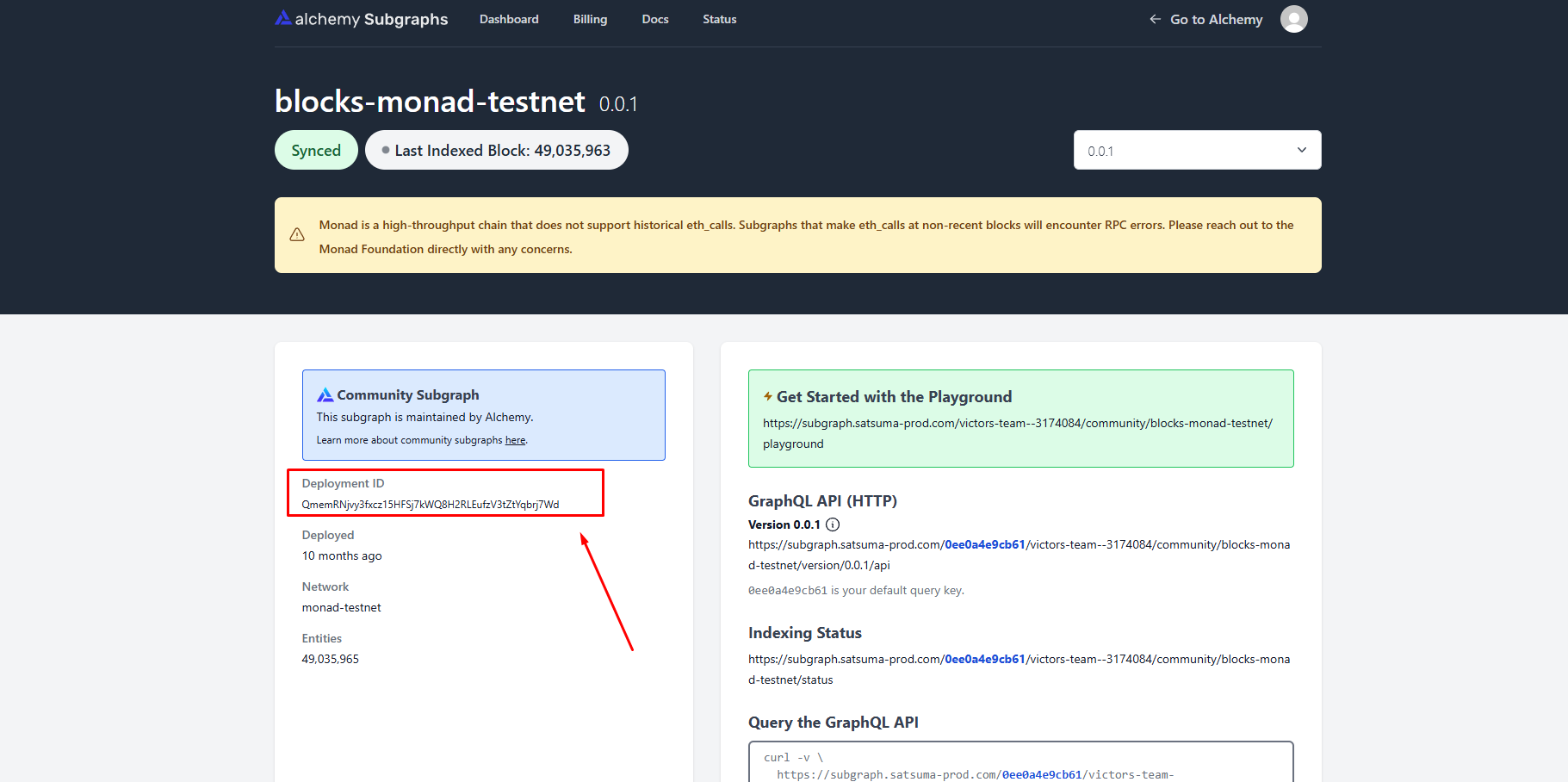
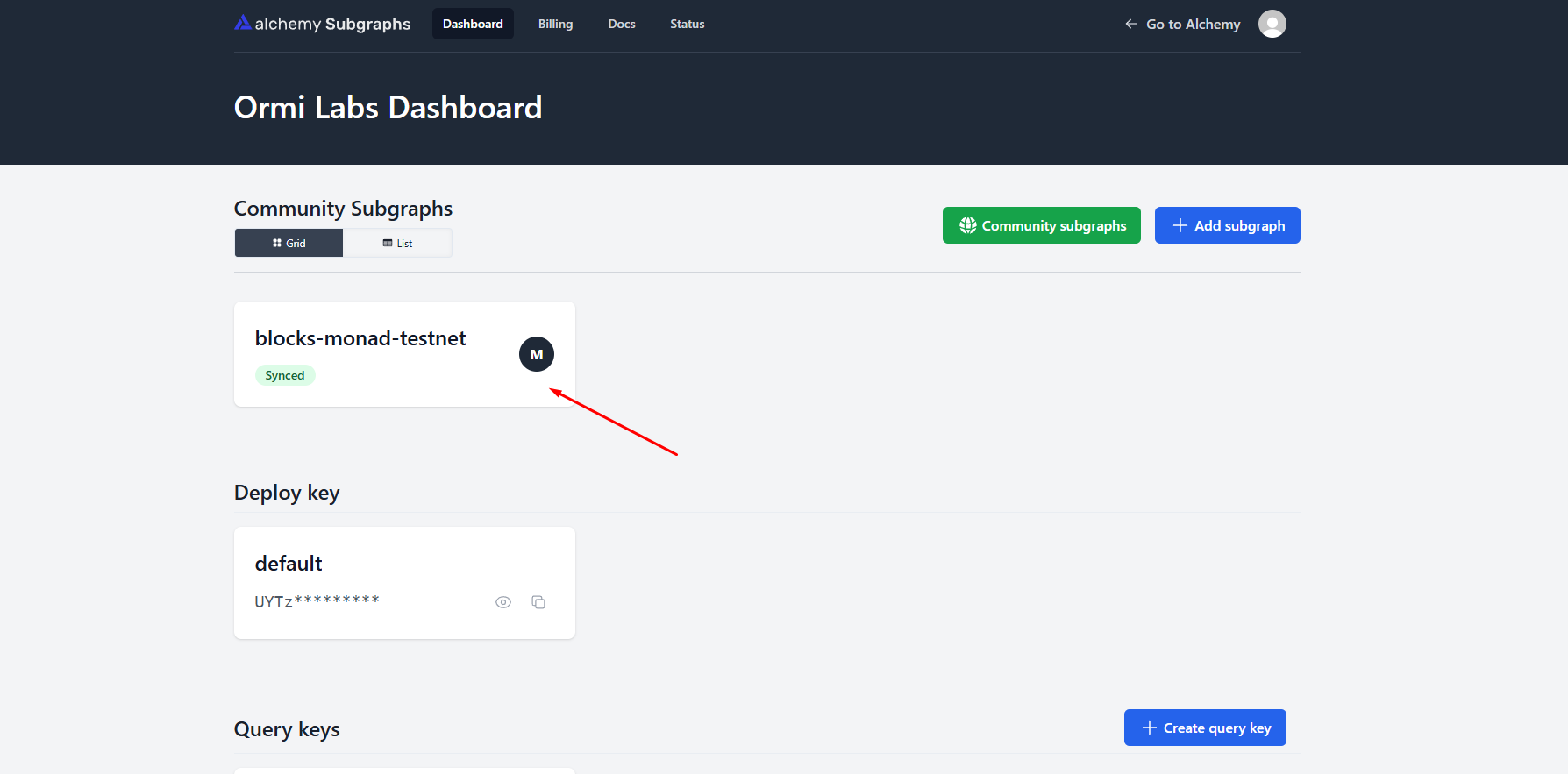
1. Go to your Alchemy Subgraphs dashboard
2. Click on the subgraph that you want to migrate

<Frame>
  <img src="https://mintcdn.com/ormilabs/h4YxPeb-6SKo2rZZ/images/0xgraph/alchemy-migration.png?fit=max&auto=format&n=h4YxPeb-6SKo2rZZ&q=85&s=40dc98404dec54521be14229ed9cf44a" alt="0xGraph graph init" width="1788" height="883" data-path="images/0xgraph/alchemy-migration.png" />

  <figcaption>API Keys</figcaption>
</Frame>

## Copy the deployment ID

<Frame>
  <img src="https://mintcdn.com/ormilabs/h4YxPeb-6SKo2rZZ/images/0xgraph/alchemy-migration2.png?fit=max&auto=format&n=h4YxPeb-6SKo2rZZ&q=85&s=3791c87b1d385af91a9b6e9b1237e0c9" alt="0xGraph graph init" width="1821" height="908" data-path="images/0xgraph/alchemy-migration2.png" />

  <figcaption>API Keys</figcaption>
</Frame>

## Retrieving the IPFS Hash (for custom Alchemy IPFS deployments)

Some Alchemy subgraphs were stored on an IPFS node that cannot be accessed through standard public gateways.

If your migration fails when using the standard IPFS URL, you can retrieve the IPFS hash by querying your Alchemy subgraph endpoint:

```
query {
  _meta {
    deployment
  }
}
```

<Note>
  This lookup may not work for every Alchemy deployment because of how their IPFS layer handled metadata. If you run into issues, contact us on
  [Telegram](https://t.me/ormi_community) or through our [contact form](https://ormilabs.com/contact-us) and we can help.
</Note>

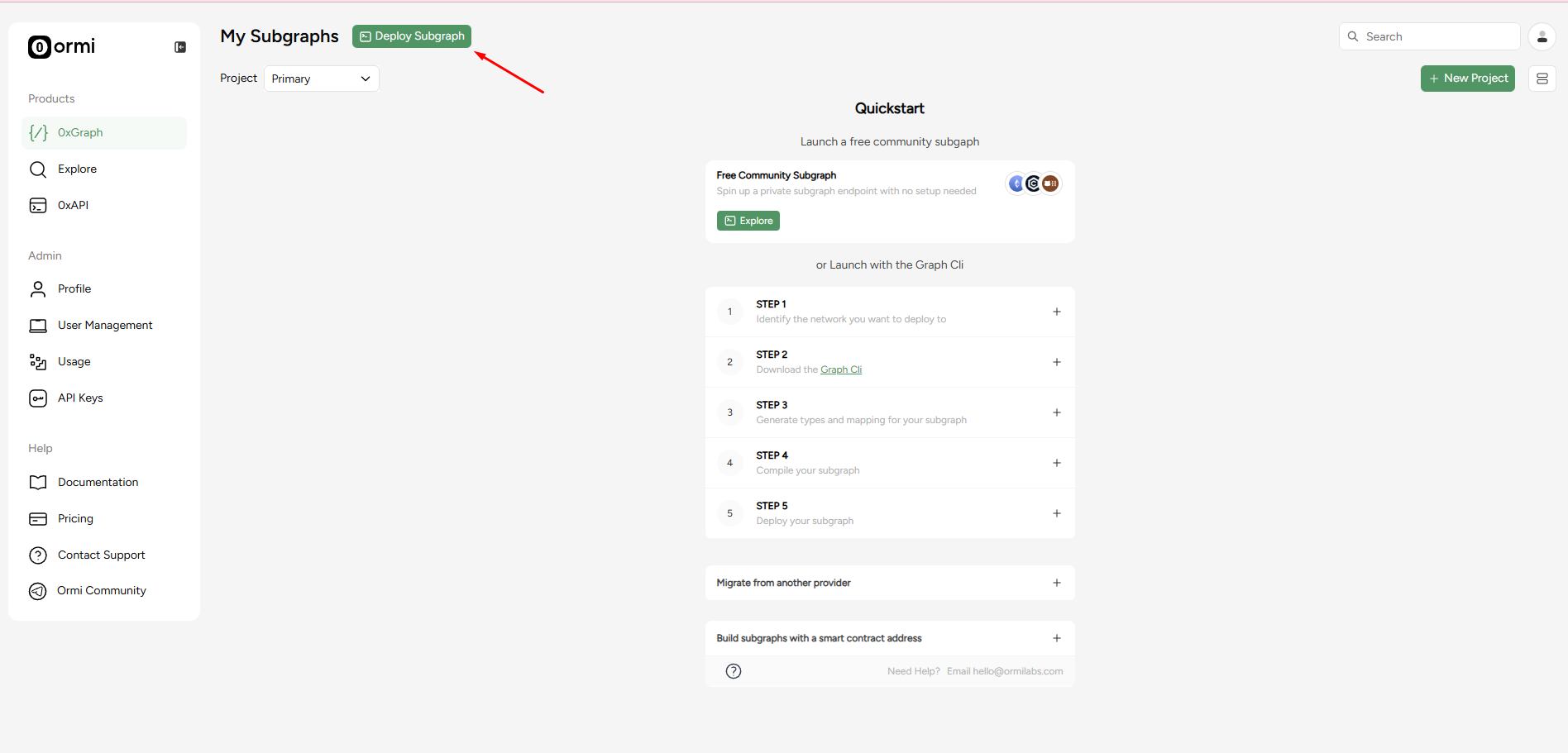
## Head back to the 0xGraph page

Press the **Deploy Subgraph** button

<Frame>
  <img src="https://mintcdn.com/ormilabs/h4YxPeb-6SKo2rZZ/images/0xgraph/alchemy-migration3.png?fit=max&auto=format&n=h4YxPeb-6SKo2rZZ&q=85&s=1cda9b075b8cc0dd888b30f760c0a797" alt="0xGraph graph init" width="1896" height="911" data-path="images/0xgraph/alchemy-migration3.png" />

  <figcaption>API Keys</figcaption>
</Frame>

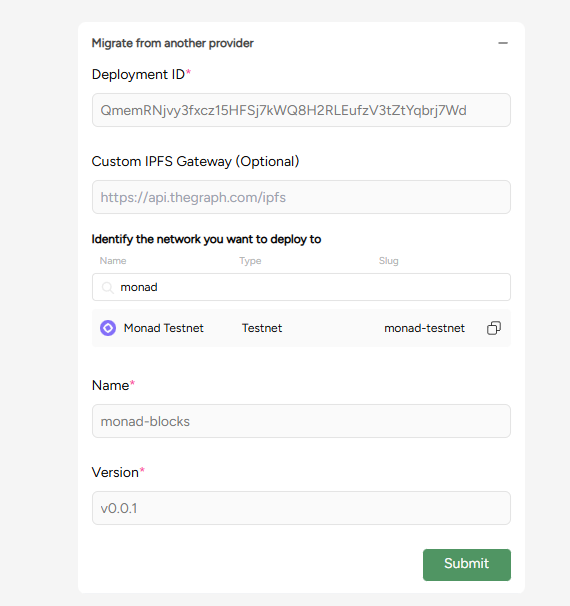
Complete the required fields in the **Migrate from another provider** section

<Frame>
  <img src="https://mintcdn.com/ormilabs/h4YxPeb-6SKo2rZZ/images/0xgraph/alchemy-migration4.png?fit=max&auto=format&n=h4YxPeb-6SKo2rZZ&q=85&s=318341aaf12f737ad39b7e45eb40428c" alt="0xGraph graph init" width="570" height="606" data-path="images/0xgraph/alchemy-migration4.png" />

  <figcaption>API Keys</figcaption>
</Frame>

1. **Deployment ID**: QmemRNjvy3fxcz15HFSj7kWQ8H2RLEufzV3tZtYqbrj7Wd
2. **Network**: Monad Testnet
3. **Name**: monad-blocks
4. **Version**: v0.0.1

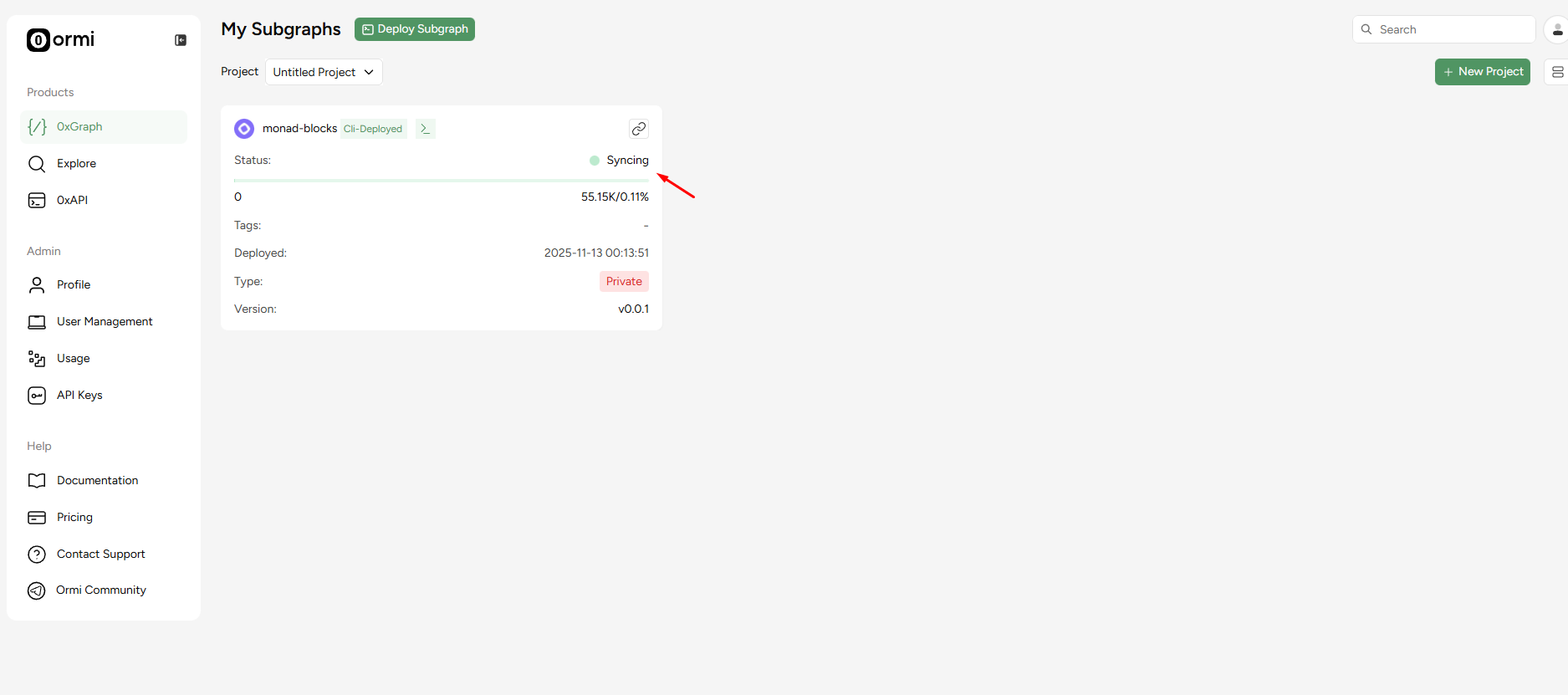
After entering these details, you’ll be redirected to the 0xGraph dashboard, where your subgraph will start syncing automatically.

<Frame>
  <img src="https://mintcdn.com/ormilabs/h4YxPeb-6SKo2rZZ/images/0xgraph/alchemy-migration5.png?fit=max&auto=format&n=h4YxPeb-6SKo2rZZ&q=85&s=1f745bcdad5ac10e2e0ae5867376750c" alt="0xGraph graph init" width="1875" height="831" data-path="images/0xgraph/alchemy-migration5.png" />

  <figcaption>API Keys</figcaption>
</Frame>

That’s it! Once your subgraph syncs, you’ll be able to query data directly through Ormi’s 0xGraph.

## Endpoint differences

| **Alchemy**                                                                          | **Ormi**                                                                                    |
| ------------------------------------------------------------------------------------ | ------------------------------------------------------------------------------------------- |
| `https://subgraph.satsuma-prod.com/<query_key>/<project_prefix>/<subgraph_name>/api` | `https://api.subgraph.ormilabs.com/api/public/query_deployment?subgraph_id=<deployment_id>` |

## Post-migration checklist

1. Open your subgraph in the Ormi dashboard
2. Check sync status and logs to make sure it's indexing
3. Test GraphQL queries using the GraphQL link
4. Use tags if you plan on updating your subgraph

## Need help?

For assistance with large or complex migrations, our team is here to help.

* **[Contact us](https://ormilabs.com/contact-us)**
* **[Join our telegram](https://t.me/ormi_community)**
* **[Book a call with us](https://calendly.com/ormilabs)**

## Next steps
<div
  className="grid grid-cols-1 md:grid-cols-2 gap-6 not-prose"
  style={{
marginBottom: '4rem',
maxWidth: '1200px',
margin: '0 auto 4rem auto',
alignItems: 'stretch'
}}
>
  <a
    href="/docs/subgraphs/query-data/querying-a-subgraph"
    style={{
textDecoration: 'none',
color: 'inherit',
display: 'flex'
}}
  >
    <div
      className="group border border-gray-200 rounded-xl p-6 hover:border-green-500 hover:shadow-lg transition-all duration-200 cursor-pointer"
      style={{
  minHeight: '200px',
  display: 'flex',
  flexDirection: 'column',
  width: '100%'
}}
    >
      <div className="flex items-center mb-4">
        <div className="mr-3" style={{ color: '#3E744D' }}>
          <img src="https://mintcdn.com/ormilabs/qV2VfGqVCCe99Ked/images/icons/scan.svg?fit=max&auto=format&n=qV2VfGqVCCe99Ked&q=85&s=e45e14abccf8d0fec7df137623baa1ab" alt="query subgraph icon" width="20" height="20" data-path="images/icons/scan.svg" />
        </div>

        <div className="text-lg font-semibold text-gray-900" role="heading" aria-level="3">How to query a subgraph</div>
      </div>

      <p className="text-gray-600 text-sm flex-grow">
        Learn how to run GraphQL queries to fetch smart contract data from deployed subgraphs.
      </p>
    </div>
  </a>

  {" "}

  <a
    href="/docs/subgraphs/manage-and-monitor/monitor-subgraph"
    style={{
textDecoration: "none",
color: "inherit",
display: "flex",
}}
  >
    <div
      className="group border border-gray-200 rounded-xl p-6 hover:border-green-500 hover:shadow-lg transition-all duration-200 cursor-pointer"
      style={{
  minHeight: "200px",
  display: "flex",
  flexDirection: "column",
  width: "100%",
}}
    >
      <div className="flex items-center mb-4">
        <div className="mr-3" style={{ color: "#3E744D" }}>
          <img src="https://mintcdn.com/ormilabs/qV2VfGqVCCe99Ked/images/icons/monitor-check.svg?fit=max&auto=format&n=qV2VfGqVCCe99Ked&q=85&s=4955d6d9d247161fb8fe84ae89ce1203" alt="monitor subgraph icon" width="20" height="20" data-path="images/icons/monitor-check.svg" />
        </div>

        <div className="text-lg font-semibold text-gray-900" role="heading" aria-level="3">
          How to monitor your subgraph
        </div>
      </div>

      <p className="text-gray-600 text-sm flex-grow">Learn how to monitor your subgraph syncing progress and logs after deployment.</p>
    </div>
  </a>
</div>