> ## Documentation Index
> Fetch the complete documentation index at: https://ormilabs.com/docs/llms.txt
> Use this file to discover all available pages before exploring further.
# How to create and manage subgraph webhooks
> Subgraph webhooks send POST requests in real time when entities are inserted, updated, or deleted, so you can react instantly to on-chain data changes.
## What are webhooks?
Webhooks let your backend receive **real-time updates** whenever data changes in your subgraph, for example, when an entity is **inserted, updated, or deleted**.
This is useful for:
* Triggering external workflows.
* Syncing your database with on-chain data.
* Integrating subgraph evenets into other systems or services.
## How it works
Whenever a subgraph handler runs `entity.save()`, or removes an entity, the change is recorded. A real-time watcher detects the event and sends an **HTTP POST** request to your configured webhook endpoint.
### Payload includes:
* **Operation type**: `INSERT`, `UPDATE`, or `DELETE`
* **Entity name**: the affected entity (ex. `approved`, `user`, `pool`)
* **Entity data**: The new or updated values
* **Timestamp** and **block number**
## Creating a Webhook
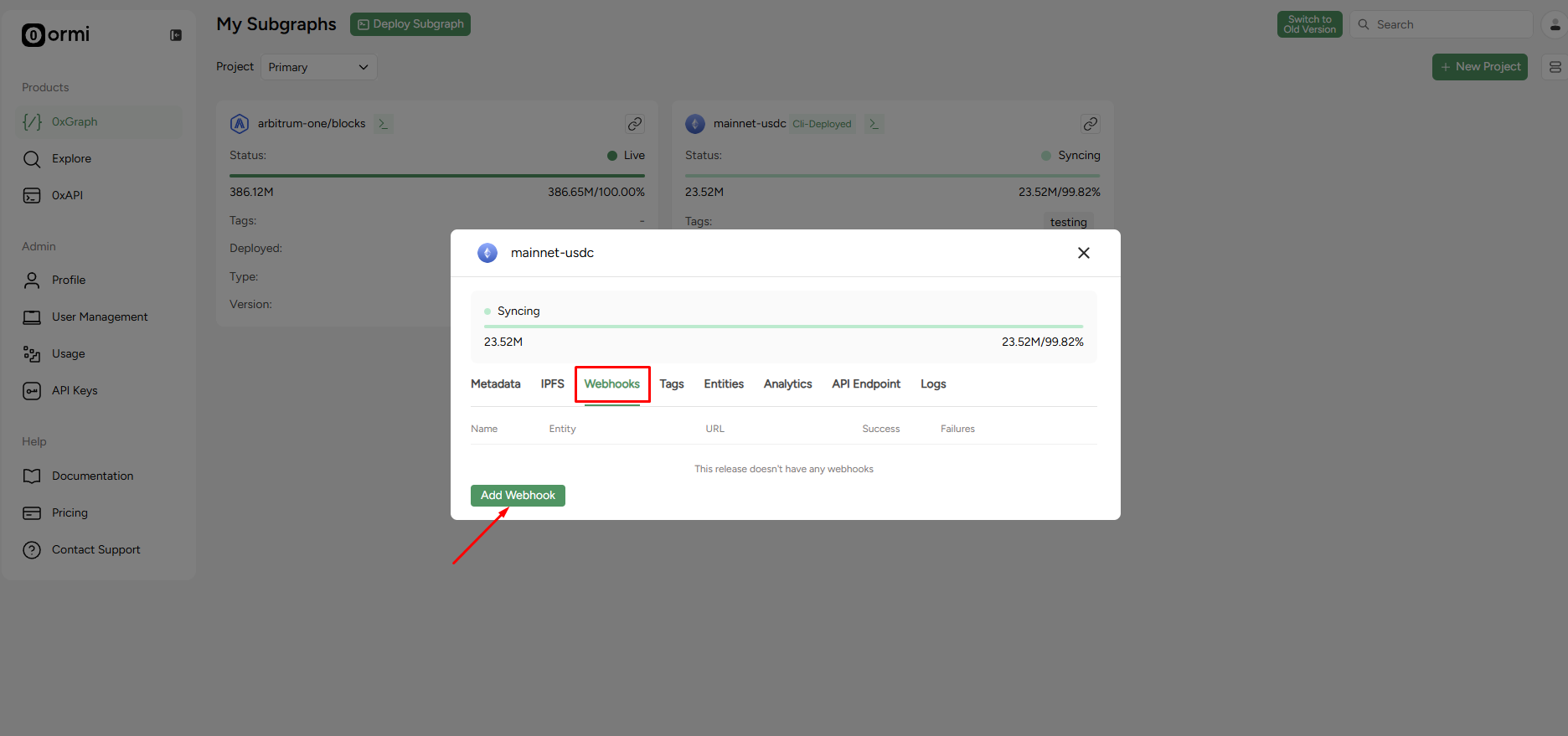
You can create a new webhook through the 0xGraph dashboard.
 API Keys
1. Navigate to the **Webhooks** tab of your subgraph.
2. Click on the **Add Webhook** button.
API Keys
1. Navigate to the **Webhooks** tab of your subgraph.
2. Click on the **Add Webhook** button.
 API Keys
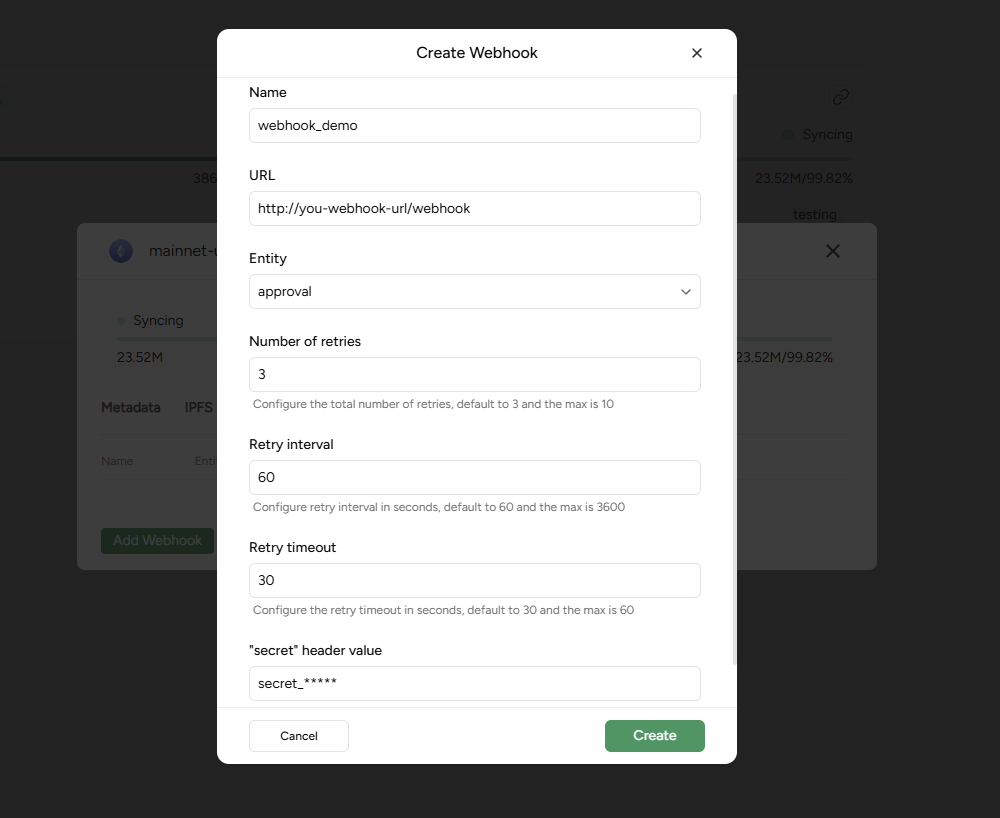
### Parameters of each field
* **Name**: A descriptive name for your webhook (e.g., `webhook_demo`).
* **URL**: The HTTP endpoint where the webhook payloads will be sent.
* **Entity**: The specific entity you want to track (ex., `approved`).
* **Number of retries**: Configure the total number of retries. Defaults to 3, with a maximum of 10.
* **Retry interval**: Configure the retry interval in seconds. Defaults to 60, with a maximum of 3600.
* **Retry timeout**: Configure the retry timeout in seconds. Defaults to 30, with a maximum of 60.
* **"secret" header value**: An optional secret string that will be sent in a designated webhook secret header. This allows your endpoint to verify that the request is authentic.
3. Fill in the required fields in the **Create Webhook** pop-up.
4. Click **Create.**
## Viewing and managing webhooks
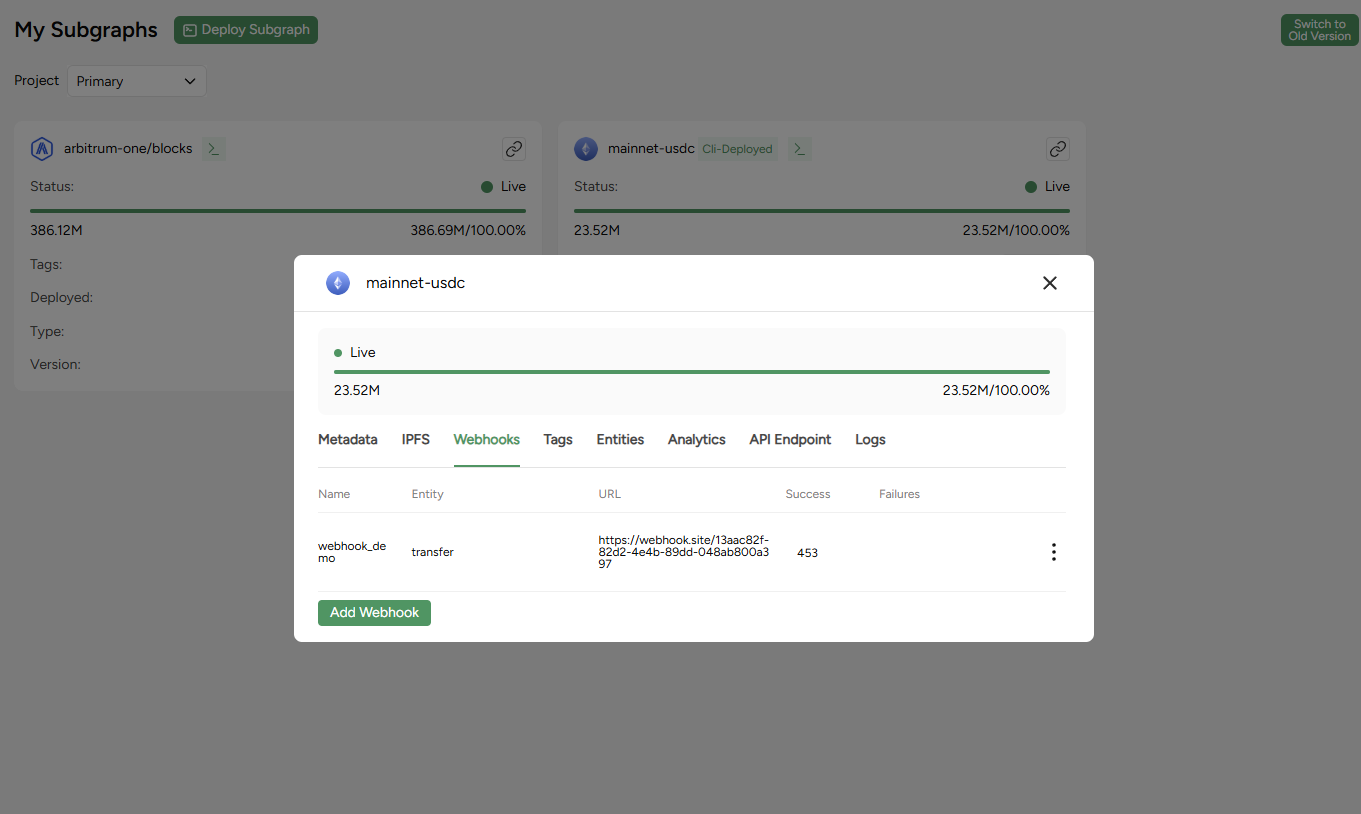
All created webhooks appear in your subgraph’s **Webhooks** list.
API Keys
### Parameters of each field
* **Name**: A descriptive name for your webhook (e.g., `webhook_demo`).
* **URL**: The HTTP endpoint where the webhook payloads will be sent.
* **Entity**: The specific entity you want to track (ex., `approved`).
* **Number of retries**: Configure the total number of retries. Defaults to 3, with a maximum of 10.
* **Retry interval**: Configure the retry interval in seconds. Defaults to 60, with a maximum of 3600.
* **Retry timeout**: Configure the retry timeout in seconds. Defaults to 30, with a maximum of 60.
* **"secret" header value**: An optional secret string that will be sent in a designated webhook secret header. This allows your endpoint to verify that the request is authentic.
3. Fill in the required fields in the **Create Webhook** pop-up.
4. Click **Create.**
## Viewing and managing webhooks
All created webhooks appear in your subgraph’s **Webhooks** list.
 API Keys
For each webhook, you can view:
* The tracked entity and target URL.
* Last delivery time.
* Number of successful and failed deliveries.
* Retry and error statistics.
## Webhook payload structure
The webhook will send a JSON payload to your configured URL. The main payload object contains the following fields:
* `op` (string): The type of operation that triggered the webhook. Possible values are `"INSERT"`, `"UPDATE"`, or `"DELETE"`.
* `data_source` (string): Identifier for the subgraph or indexer being tracked.
* `data` (object): Contains the actual entity data that changed. It has two sub-fields:
* `old` (object | null): The state of the entity before the change. This will be `null` if the `op` is `"INSERT"`.
* `new` (object | null): The state of the entity after the change. This will be `null` if the `op` is `"DELETE"`.
* `webhook_name` (string): The name you assigned to your webhook during creation.
* `webhook_id` (string): A unique identifier for the webhook configuration.
* `id` (string): A unique identifier for this specific event notification.
* `delivery_info` (object): Information about the delivery attempt for this webhook. It has two sub-fields:
* `max_retries` (integer): The maximum number of retry attempts configured for this webhook.
* `current_retry` (integer): The current retry attempt number for this specific event (0 for the initial attempt).
* `entity` (string): The name of the subgraph entity being tracked.
### Example Payloads:
**`INSERT` operation:**
```json theme={null}
{
"op": "INSERT",
"data_source": "privateURL/v0.0.1",
"data": {
"new": {
"id": "ERC20Approve-0xbb06dca3ae6887fabf931640f67cab3e3a16f4dc-w\\u001c\\u001b\\u0002\\ufffd\\ufffd\\ufffd\\u07Ջ^\\ufffdcO\\ufffd\\ufffd(7C\\u001c\\u001b-\\ufffd\\u0016僞\\ufffdm\\ufffd\\ufffdI+y\\ufffd\\ufffd^\\u0015\\ufffd\\ufffdY\\ufffd",
"vid": 7271978,
"owner": "\\\\x771cab02cfc4ebd58b5e9b634fe7f82837431cc6",
"token": "0xbb06dca3ae6887fabf931640f67cab3e3a16f4dc",
"amount": 1.157920892373162e77,
"is_all": false,
"spender": "\\\\xbde5839ec36db2ac492b79e9e3b75e15fa8a59ec",
"updated_at": 1747127781,
"block_range": "[20405156,)"
},
"old": null
},
"webhook_name": "webhook_demo",
"webhook_id": "fcdce3c3-b288-4bb1-a7df-0d5acd8cd447",
"id": "5b623fd0-b539-400b-bbb3-060d95403a64",
"delivery_info": {
"max_retries": 3,
"current_retry": 0
},
"entity": "approved"
}
```
**`UPDATE` operation :**
```json theme={null}
{
"data": {
"new": {
"id": "ERC20Approve-0xdeaddeaddeaddeaddeaddeaddeaddeaddead0000-w Ջ^cO(7C -w Ջ^cO(7C ",
"vid": 7271844,
"owner": "\x771cab02cfc4ebd58b5e9b634fe7f82837431cc6",
"token": "0xdeaddeaddeaddeaddeaddeaddeaddeaddead0000",
"amount": 115792089237316195423570985008687907853269984665640561215151422165121803858650,
"is_all": false,
"spender": "\x771cab02cfc4ebd58b5e9b634fe7f82837431cc6",
"updated_at": 1747126465,
"block_range": "[20405057,20405060)"
},
"old": {
"id": "ERC20Approve-0xdeaddeaddeaddeaddeaddeaddeaddeaddead0000-w Ջ^cO(7C -w Ջ^cO(7C ",
"vid": 7271844,
"owner": "\x771cab02cfc4ebd58b5e9b634fe7f82837431cc6",
"token": "0xdeaddeaddeaddeaddeaddeaddeaddeaddead0000",
"amount": 115792089237316195423570985008687907853269984665640561215151422165121803858650,
"is_all": false,
"spender": "\x771cab02cfc4ebd58b5e9b634fe7f82837431cc6",
"updated_at": 1747126465,
"block_range": "[20405057,)"
}
},
"data_source": "privateURL/v0.0.1",
"delivery_info": {
"current_retry": 0,
"max_retries": 3
},
"entity": "approved",
"id": "dd2b6013-22e1-4e8e-a665-be5276144a68",
"op": "UPDATE",
"webhook_id": "fcdce3c3-b288-4bb1-a7df-0d5acd8cd447",
"webhook_name": "webhook_demo"
}
```
API Keys
For each webhook, you can view:
* The tracked entity and target URL.
* Last delivery time.
* Number of successful and failed deliveries.
* Retry and error statistics.
## Webhook payload structure
The webhook will send a JSON payload to your configured URL. The main payload object contains the following fields:
* `op` (string): The type of operation that triggered the webhook. Possible values are `"INSERT"`, `"UPDATE"`, or `"DELETE"`.
* `data_source` (string): Identifier for the subgraph or indexer being tracked.
* `data` (object): Contains the actual entity data that changed. It has two sub-fields:
* `old` (object | null): The state of the entity before the change. This will be `null` if the `op` is `"INSERT"`.
* `new` (object | null): The state of the entity after the change. This will be `null` if the `op` is `"DELETE"`.
* `webhook_name` (string): The name you assigned to your webhook during creation.
* `webhook_id` (string): A unique identifier for the webhook configuration.
* `id` (string): A unique identifier for this specific event notification.
* `delivery_info` (object): Information about the delivery attempt for this webhook. It has two sub-fields:
* `max_retries` (integer): The maximum number of retry attempts configured for this webhook.
* `current_retry` (integer): The current retry attempt number for this specific event (0 for the initial attempt).
* `entity` (string): The name of the subgraph entity being tracked.
### Example Payloads:
**`INSERT` operation:**
```json theme={null}
{
"op": "INSERT",
"data_source": "privateURL/v0.0.1",
"data": {
"new": {
"id": "ERC20Approve-0xbb06dca3ae6887fabf931640f67cab3e3a16f4dc-w\\u001c\\u001b\\u0002\\ufffd\\ufffd\\ufffd\\u07Ջ^\\ufffdcO\\ufffd\\ufffd(7C\\u001c\\u001b-\\ufffd\\u0016僞\\ufffdm\\ufffd\\ufffdI+y\\ufffd\\ufffd^\\u0015\\ufffd\\ufffdY\\ufffd",
"vid": 7271978,
"owner": "\\\\x771cab02cfc4ebd58b5e9b634fe7f82837431cc6",
"token": "0xbb06dca3ae6887fabf931640f67cab3e3a16f4dc",
"amount": 1.157920892373162e77,
"is_all": false,
"spender": "\\\\xbde5839ec36db2ac492b79e9e3b75e15fa8a59ec",
"updated_at": 1747127781,
"block_range": "[20405156,)"
},
"old": null
},
"webhook_name": "webhook_demo",
"webhook_id": "fcdce3c3-b288-4bb1-a7df-0d5acd8cd447",
"id": "5b623fd0-b539-400b-bbb3-060d95403a64",
"delivery_info": {
"max_retries": 3,
"current_retry": 0
},
"entity": "approved"
}
```
**`UPDATE` operation :**
```json theme={null}
{
"data": {
"new": {
"id": "ERC20Approve-0xdeaddeaddeaddeaddeaddeaddeaddeaddead0000-w Ջ^cO(7C -w Ջ^cO(7C ",
"vid": 7271844,
"owner": "\x771cab02cfc4ebd58b5e9b634fe7f82837431cc6",
"token": "0xdeaddeaddeaddeaddeaddeaddeaddeaddead0000",
"amount": 115792089237316195423570985008687907853269984665640561215151422165121803858650,
"is_all": false,
"spender": "\x771cab02cfc4ebd58b5e9b634fe7f82837431cc6",
"updated_at": 1747126465,
"block_range": "[20405057,20405060)"
},
"old": {
"id": "ERC20Approve-0xdeaddeaddeaddeaddeaddeaddeaddeaddead0000-w Ջ^cO(7C -w Ջ^cO(7C ",
"vid": 7271844,
"owner": "\x771cab02cfc4ebd58b5e9b634fe7f82837431cc6",
"token": "0xdeaddeaddeaddeaddeaddeaddeaddeaddead0000",
"amount": 115792089237316195423570985008687907853269984665640561215151422165121803858650,
"is_all": false,
"spender": "\x771cab02cfc4ebd58b5e9b634fe7f82837431cc6",
"updated_at": 1747126465,
"block_range": "[20405057,)"
}
},
"data_source": "privateURL/v0.0.1",
"delivery_info": {
"current_retry": 0,
"max_retries": 3
},
"entity": "approved",
"id": "dd2b6013-22e1-4e8e-a665-be5276144a68",
"op": "UPDATE",
"webhook_id": "fcdce3c3-b288-4bb1-a7df-0d5acd8cd447",
"webhook_name": "webhook_demo"
}
```