> ## Documentation Index
> Fetch the complete documentation index at: https://ormilabs.com/docs/llms.txt
> Use this file to discover all available pages before exploring further.

# How to deploy a community subgraph

> Community subgraphs are pre-built, fully indexed subgraphs you can deploy in minutes and start querying right away.

<div
  style={{
margin: "0",
padding: "1rem 1.25rem",
overflow: "hidden",
borderRadius: "1rem",
display: "flex",
gap: "0.75rem",
border: "1px solid rgba(113, 113, 122, 0.2)",
backgroundColor: "rgba(244, 244, 245, 0.5)",
}}
>
  <div style={{ marginTop: "0.125rem", width: "1rem" }}>
    <svg
      viewBox="0 0 20 20"
      fill="currentColor"
      xmlns="http://www.w3.org/2000/svg"
      style={{
    width: "1.25rem",
    height: "1.25rem",
    color: "rgba(113, 113, 122, 0.6)",
  }}
    >
      <path d="M8 0C3.58125 0 0 3.58125 0 8C0 12.4187 3.58125 16 8 16C12.4187 16 16 12.4187 16 8C16 3.58125 12.4187 0 8 0ZM8 14.5C4.41563 14.5 1.5 11.5841 1.5 8C1.5 4.41594 4.41563 1.5 8 1.5C11.5844 1.5 14.5 4.41594 14.5 8C14.5 11.5841 11.5844 14.5 8 14.5ZM9.25 10.5H8.75V7.75C8.75 7.3375 8.41563 7 8 7H7C6.5875 7 6.25 7.3375 6.25 7.75C6.25 8.1625 6.5875 8.5 7 8.5H7.25V10.5H6.75C6.3375 10.5 6 10.8375 6 11.25C6 11.6625 6.3375 12 6.75 12H9.25C9.66406 12 10 11.6641 10 11.25C10 10.8359 9.66563 10.5 9.25 10.5ZM8 6C8.55219 6 9 5.55219 9 5C9 4.44781 8.55219 4 8 4C7.44781 4 7 4.44687 7 5C7 5.55313 7.44687 6 8 6Z" />
    </svg>
  </div>

  <div style={{ fontSize: "0.875rem", minWidth: "0", width: "100%" }}>
    <h3 style={{ fontWeight: "600", margin: "0 0 0.5rem 0" }}>No account? No problem.</h3>

    <p style={{ margin: "0" }}>
      Deploy or query community subgraphs instantly. [Sign up](http://app.ormilabs.com/) for a free developer account - no credit card needed.{" "}
    </p>
  </div>
</div>

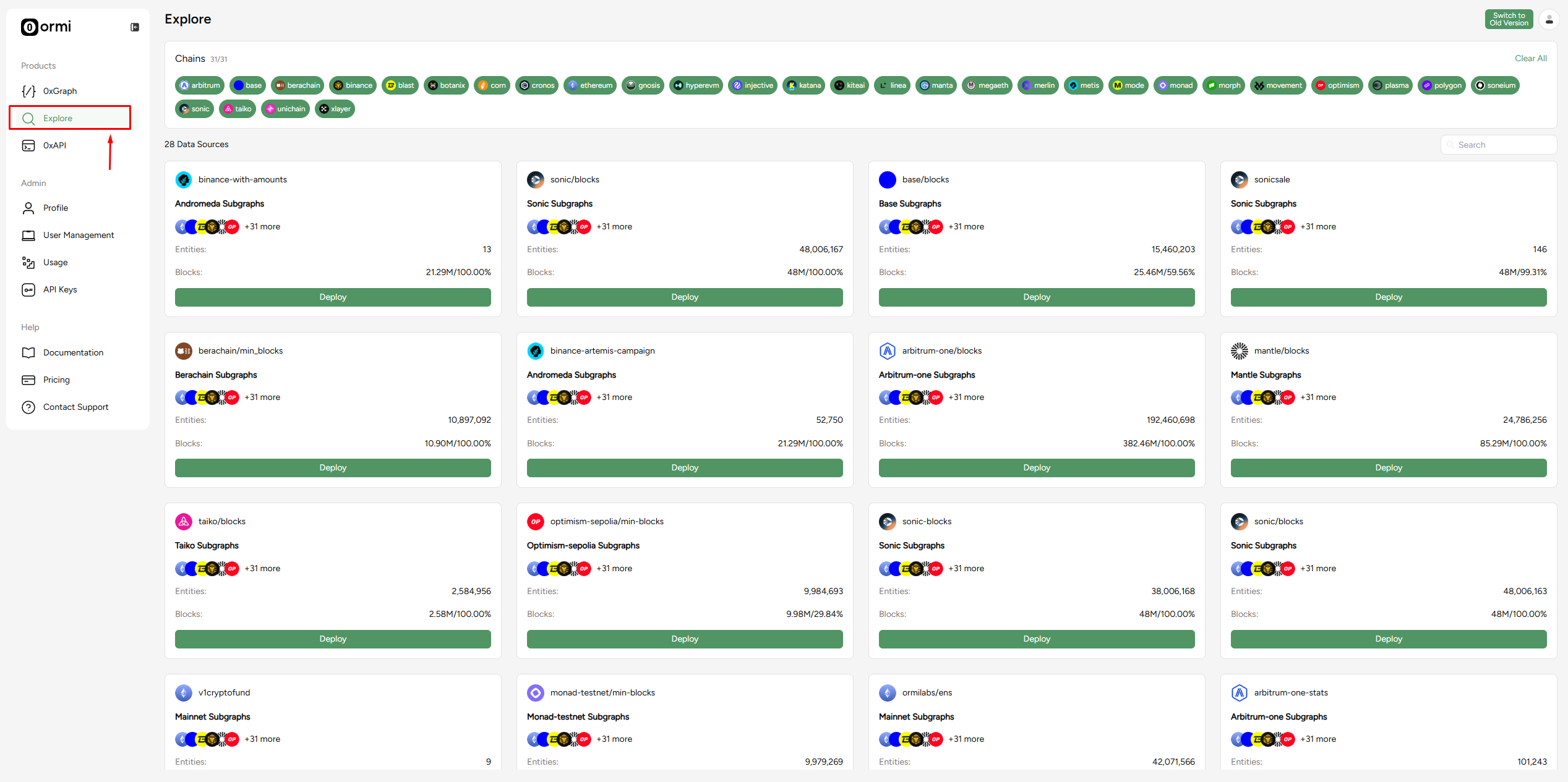
## **Step 1**: Login to the [Ormi App](https://app.ormilabs.com/) and click Explore

<Frame>
  <img src="https://mintcdn.com/ormilabs/QF_fmnEzWAEcNv02/images/0xgraph-explore.png?fit=max&auto=format&n=QF_fmnEzWAEcNv02&q=85&s=00b38abe70fe05222a56eeb64adcaddd" alt="0xGraph Community Subgraphs" width="2535" height="1265" data-path="images/0xgraph-explore.png" />
</Frame>

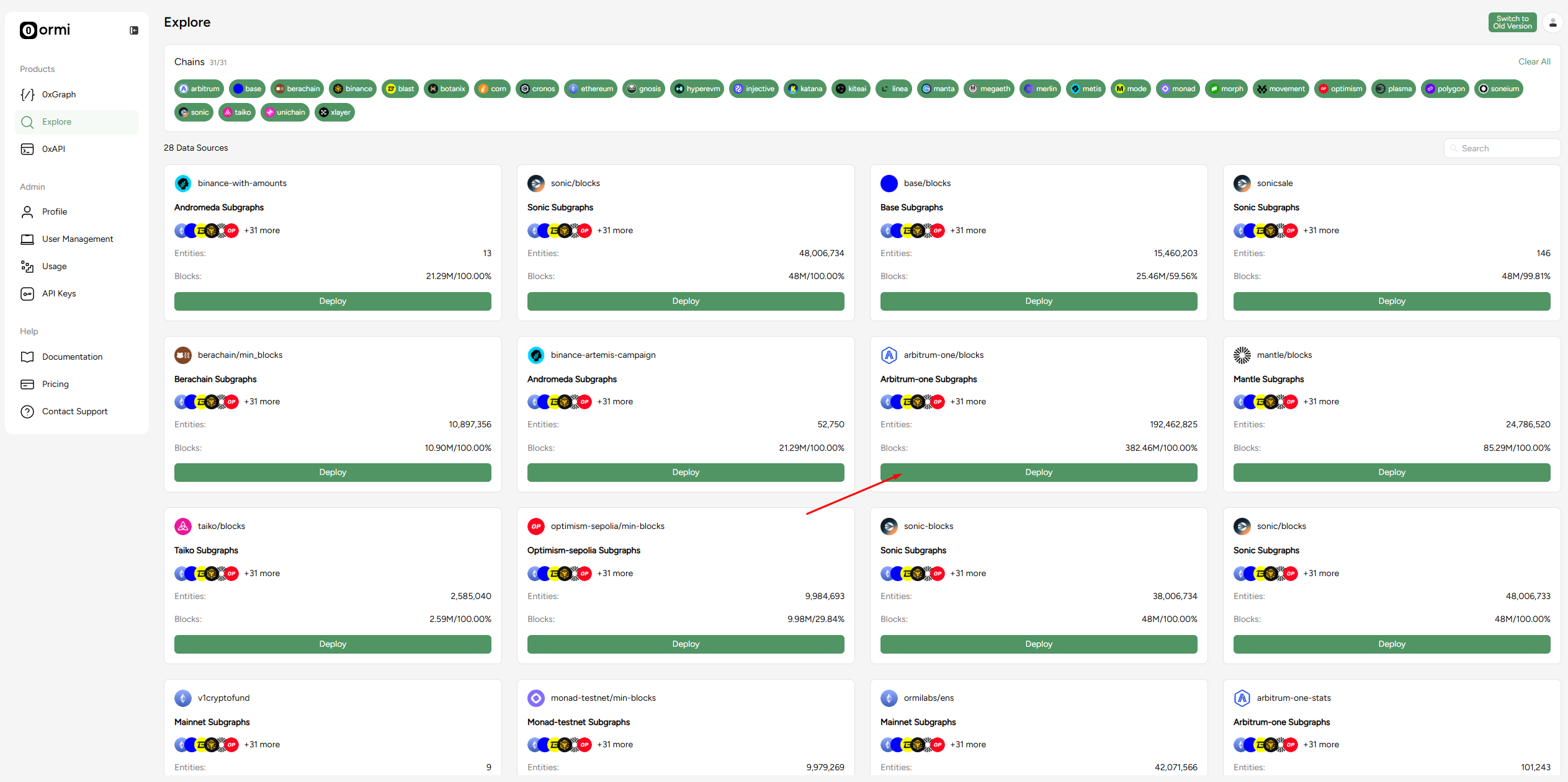
## **Step 2**: Choose a Subgraph and press Deploy

We'll deploy a community subgraph on Arbitrum-one as an example.
<Frame>
  <img src="https://mintcdn.com/ormilabs/QF_fmnEzWAEcNv02/images/0xgraph-explore-deploy.png?fit=max&auto=format&n=QF_fmnEzWAEcNv02&q=85&s=300ea9cb1168350ee6d07f3381a17f93" alt="0xGraph deploy Community Subgraphs" width="2527" height="1261" data-path="images/0xgraph-explore-deploy.png" />
</Frame>

You'll be taken to the 0xGraph page right after you click deploy.

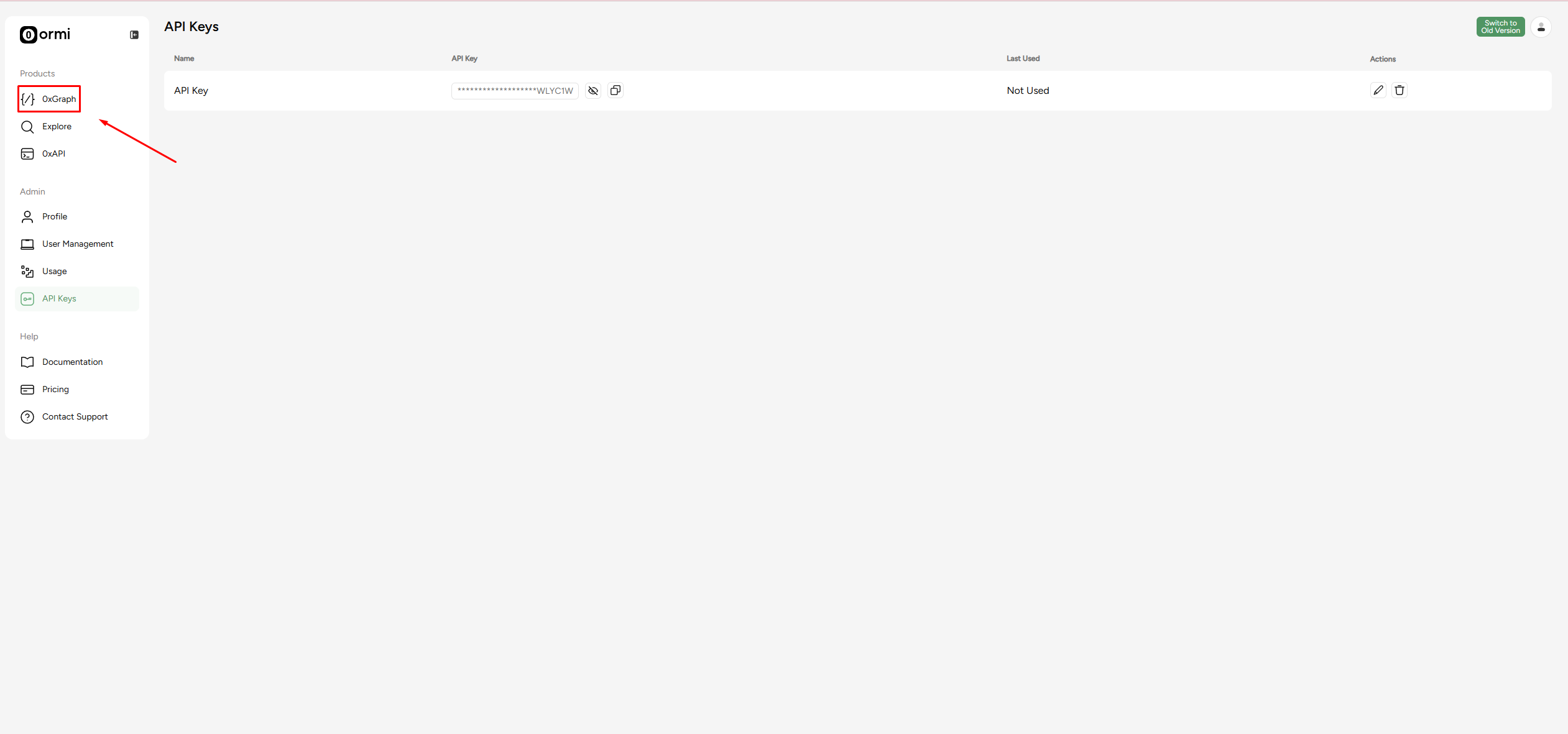
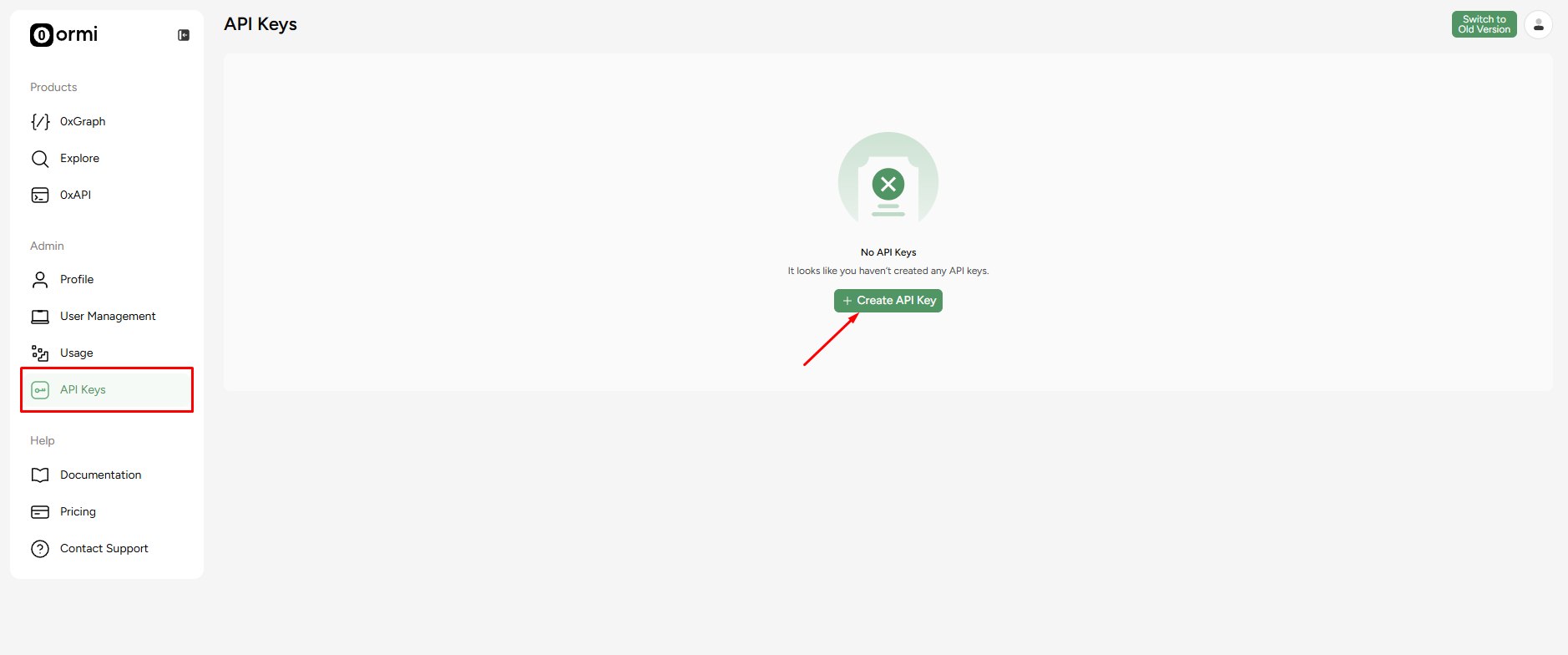
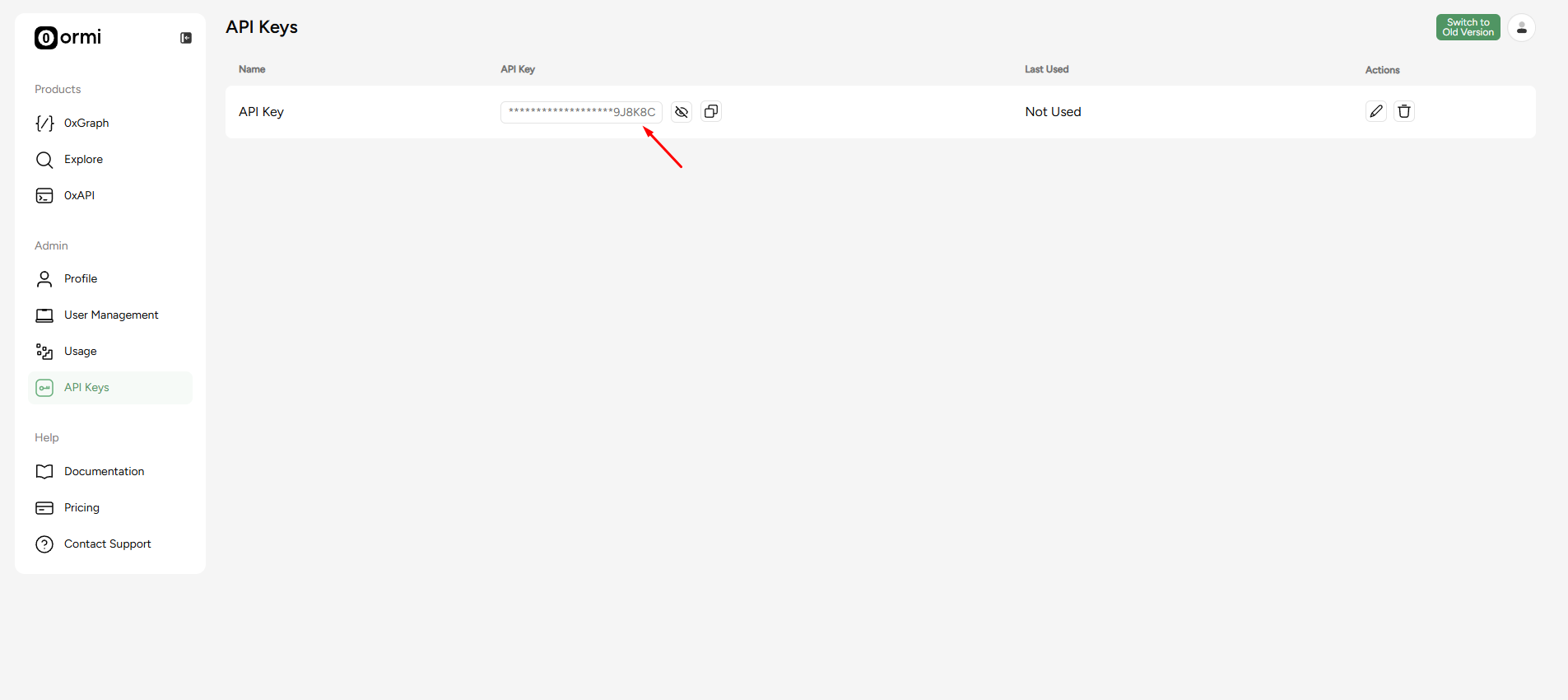
## **Step 3**: Go to the [API key page](https://app.ormilabs.com/dashboard/api) to generate an API key
<Frame>
  <img src="https://mintcdn.com/ormilabs/QF_fmnEzWAEcNv02/images/0xgraph-api-key.png?fit=max&auto=format&n=QF_fmnEzWAEcNv02&q=85&s=ac4ade1e29e7be09629130b131f3dd1b" alt="0xGraph API Keys" width="1878" height="784" data-path="images/0xgraph-api-key.png" />

  <figcaption>API Keys</figcaption>
</Frame>

Click on 'Create API Key' to generate an API key.

<Frame>
  <img src="https://mintcdn.com/ormilabs/QF_fmnEzWAEcNv02/images/0xgraph-generated-api-key.png?fit=max&auto=format&n=QF_fmnEzWAEcNv02&q=85&s=27378c8be18ab8c673ad359d766c74b9" alt="0xGraph API Keys" width="1905" height="850" data-path="images/0xgraph-generated-api-key.png" />

  <figcaption>API Keys</figcaption>
</Frame>

## **Step 4**: Head back to the 0xGraph page

<Frame>
  <img src="https://mintcdn.com/ormilabs/QF_fmnEzWAEcNv02/images/0xgraph-explore-0xgraph.png?fit=max&auto=format&n=QF_fmnEzWAEcNv02&q=85&s=8bb3915667b2f0d4eaa7ca3830608b3f" alt="0xGraph dashboard" width="2522" height="1181" data-path="images/0xgraph-explore-0xgraph.png" />

  <figcaption>API Keys</figcaption>
</Frame>

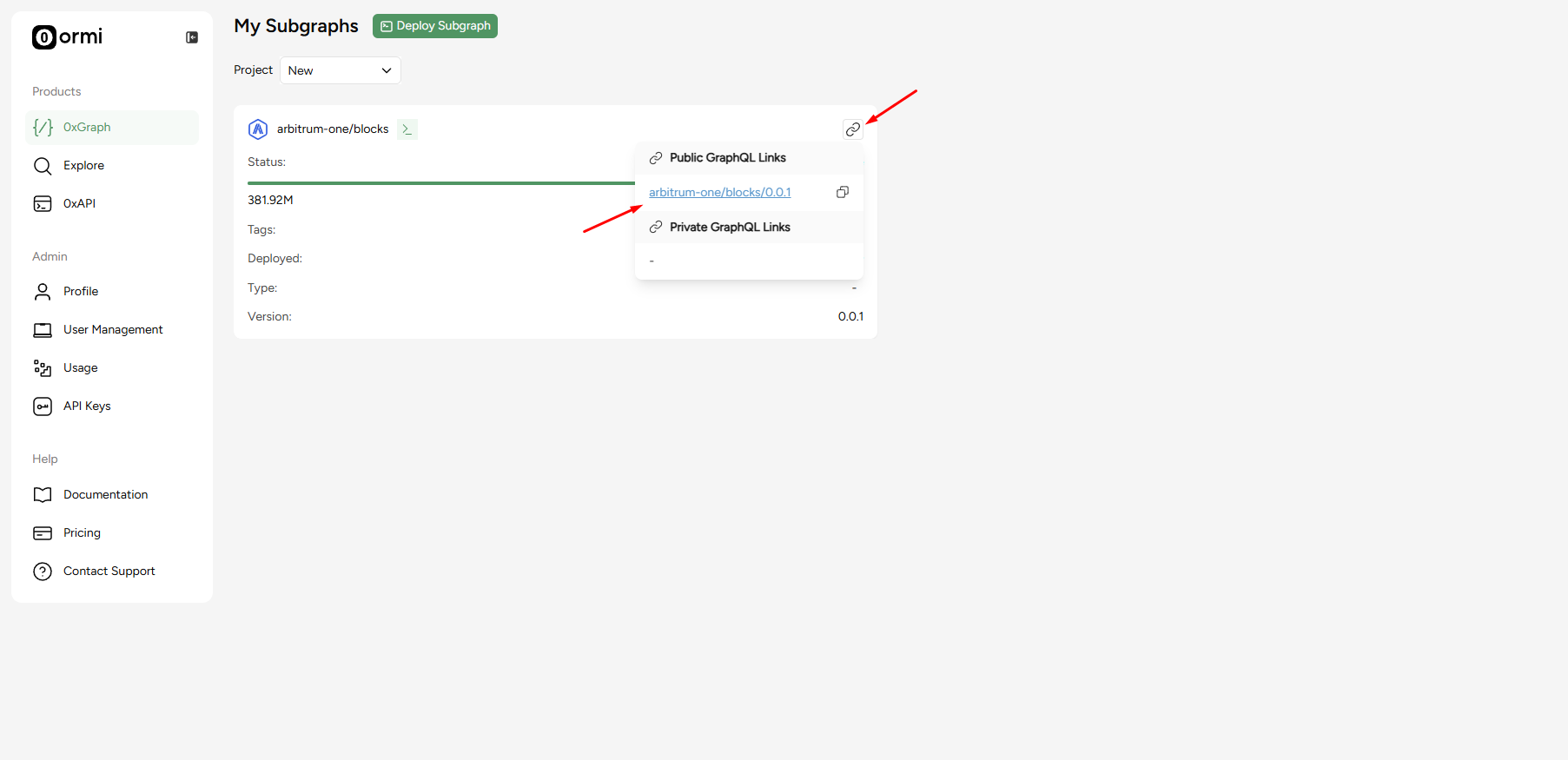
## **Step 5**: Press the URL button to see GraphQL link

<Frame>
  <img src="https://mintcdn.com/ormilabs/QF_fmnEzWAEcNv02/images/0xgraph-popup.png?fit=max&auto=format&n=QF_fmnEzWAEcNv02&q=85&s=7ab1d26600bc7e857f3df5ba676a147d" alt="0xGraph graphql link" width="1805" height="875" data-path="images/0xgraph-popup.png" />

  <figcaption>API Keys</figcaption>
</Frame>

Now you've deployed a community subgraph and can query it via the GraphQL link!

## Next steps

<div
  className="grid grid-cols-1 md:grid-cols-2 gap-6 not-prose"
  style={{
marginBottom: '4rem',
maxWidth: '1200px',
margin: '0 auto 4rem auto',
alignItems: 'stretch'
}}
>
  <a
    href="/docs/subgraphs/query-data/querying-a-subgraph"
    style={{
textDecoration: 'none',
color: 'inherit',
display: 'flex'
}}
  >
    <div
      className="group border border-gray-200 rounded-xl p-6 hover:border-green-500 hover:shadow-lg transition-all duration-200 cursor-pointer"
      style={{
  minHeight: '200px',
  display: 'flex',
  flexDirection: 'column',
  width: '100%'
}}
    >
      <div className="flex items-center mb-4">
        <div className="mr-3" style={{ color: '#3E744D' }}>
          <img src="https://mintcdn.com/ormilabs/qV2VfGqVCCe99Ked/images/icons/scan.svg?fit=max&auto=format&n=qV2VfGqVCCe99Ked&q=85&s=e45e14abccf8d0fec7df137623baa1ab" alt="query subgraph icon" width="20" height="20" data-path="images/icons/scan.svg" />
        </div>

        <div className="text-lg font-semibold text-gray-900" role="heading" aria-level="3">How to query a subgraph</div>
      </div>

      <p className="text-gray-600 text-sm flex-grow">
        Learn how to run GraphQL queries to fetch smart contract data from deployed subgraphs.
      </p>
    </div>
  </a>

  {" "}

  <a
    href="/docs/subgraphs/manage-and-monitor/monitor-subgraph"
    style={{
textDecoration: "none",
color: "inherit",
display: "flex",
}}
  >
    <div
      className="group border border-gray-200 rounded-xl p-6 hover:border-green-500 hover:shadow-lg transition-all duration-200 cursor-pointer"
      style={{
  minHeight: "200px",
  display: "flex",
  flexDirection: "column",
  width: "100%",
}}
    >
      <div className="flex items-center mb-4">
        <div className="mr-3" style={{ color: "#3E744D" }}>
          <img src="https://mintcdn.com/ormilabs/qV2VfGqVCCe99Ked/images/icons/monitor-check.svg?fit=max&auto=format&n=qV2VfGqVCCe99Ked&q=85&s=4955d6d9d247161fb8fe84ae89ce1203" alt="monitor subgraph icon" width="20" height="20" data-path="images/icons/monitor-check.svg" />
        </div>

        <div className="text-lg font-semibold text-gray-900" role="heading" aria-level="3">
          How to monitor your subgraph
        </div>
      </div>

      <p className="text-gray-600 text-sm flex-grow">Learn how to monitor your subgraph syncing progress and logs after deployment.</p>
    </div>
  </a>
</div>