> ## Documentation Index
> Fetch the complete documentation index at: https://ormilabs.com/docs/llms.txt
> Use this file to discover all available pages before exploring further.

# How to deploy a USDC subgraph with The Graph CLI

> This tutorial will gude you through creating and deploying a USDC (ERC-20) subgraph with The Graph CLI.

<Note>
  If you plan to update or redeploy your subgraph in the future, create and use a tag before you start querying the endpoint.
  [Tags](/subgraphs/manage-and-monitor/tags) let you hot-swap new deployments under the same URL later without changing your front-end code.
</Note>

## What you'll need

* An [Ormi Labs account](https://app.ormilabs.com/)
* [Graph CLI installed](https://www.npmjs.com/package/@graphprotocol/graph-cli) `npm install -g @graphprotocol/graph-cli`
* [node.js installed](https://nodejs.org/en)
* [Git installed](https://git-scm.com/downloads/win)
* The USDC contract on Ethereum mainnet: 0xA0b86991c6218b36c1d19D4a2e9Eb0cE3606eB48

**Tip**: USDC launched on Ethereum in Sept 2018; you can confirm addresses per chain in Circle’s docs if you ever target other networks.

## Getting started

1. Go to the [Ormi App](https://app.ormilabs.com) and login.
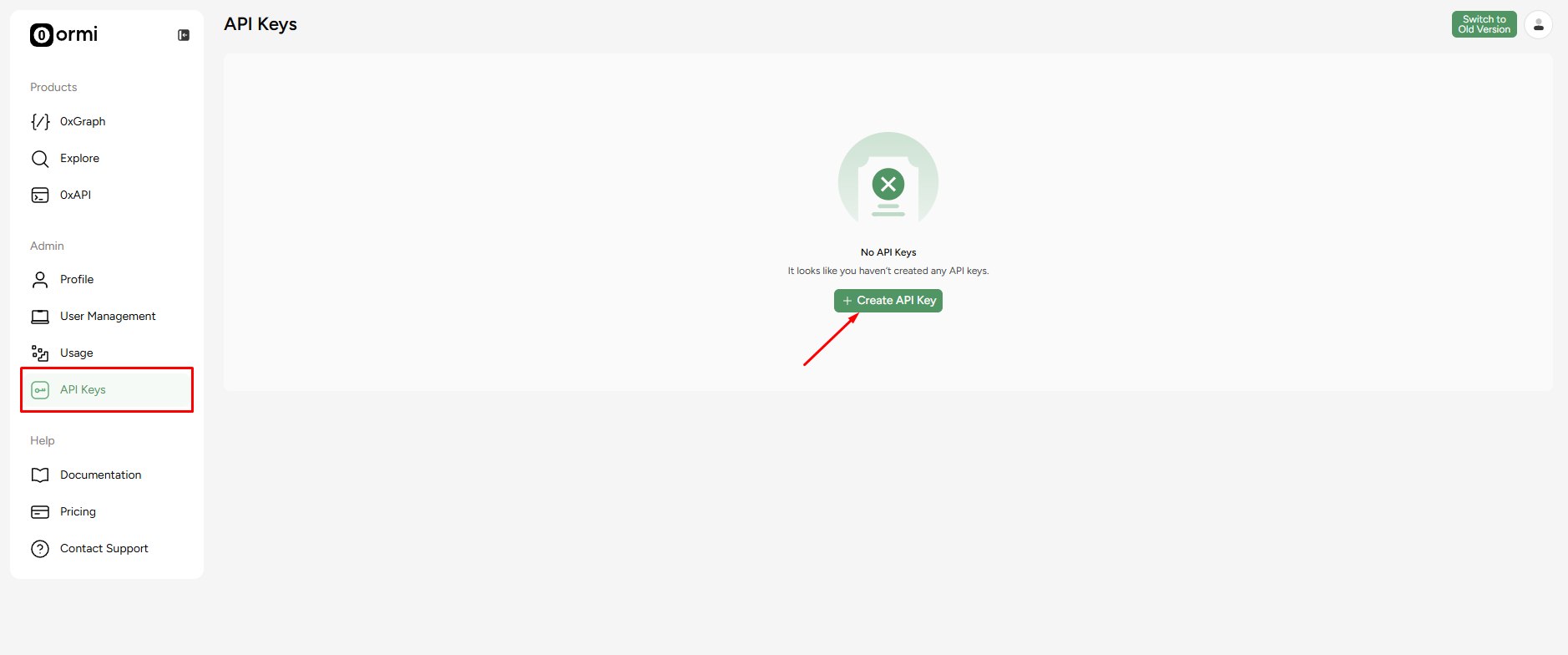
2. From the dashboard, create an API key for deployments.

<Frame>
  <img src="https://mintcdn.com/ormilabs/QF_fmnEzWAEcNv02/images/0xgraph-api-key.png?fit=max&auto=format&n=QF_fmnEzWAEcNv02&q=85&s=ac4ade1e29e7be09629130b131f3dd1b" alt="0xGraph API Keys" width="1878" height="784" data-path="images/0xgraph-api-key.png" />

  <figcaption>API Keys</figcaption>
</Frame>

Keep this page open, we’ll need the API key to deploy a subgraph.

## Running the subgraph CLI

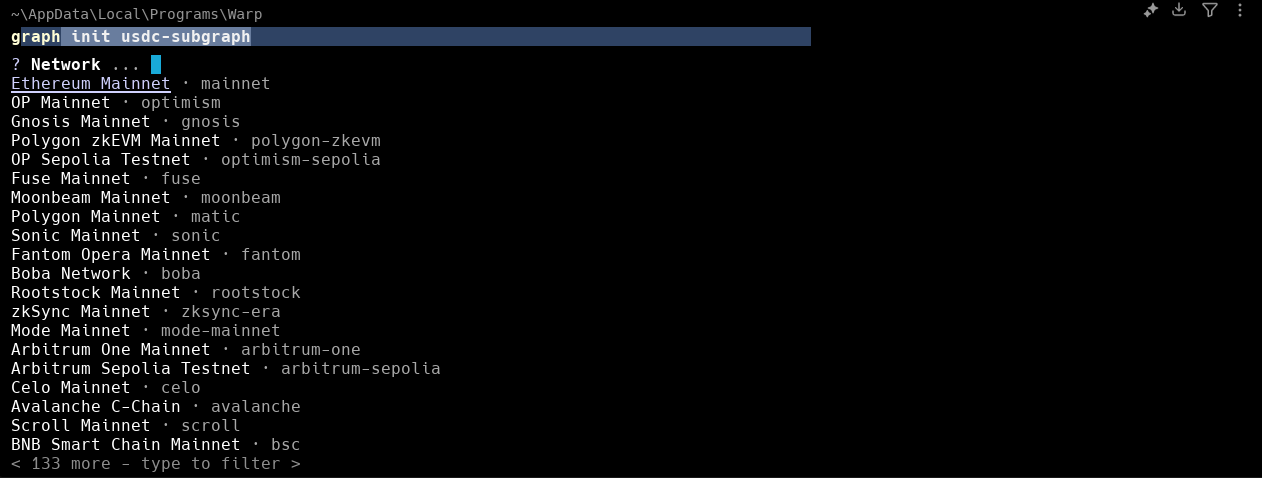
Open your terminal and run The Graph CLI init flow:

```
graph init usdc-subgraph
```

<Frame>
  <img src="https://mintcdn.com/ormilabs/vcU9W8gg4MUmMgRt/images/how-to/cli-graph-init-1.png?fit=max&auto=format&n=vcU9W8gg4MUmMgRt&q=85&s=b78bf8ed5e0dc57701872d827a8c4004" alt="0xGraph graph init" width="1262" height="478" data-path="images/how-to/cli-graph-init-1.png" />

  <figcaption>API Keys</figcaption>
</Frame>

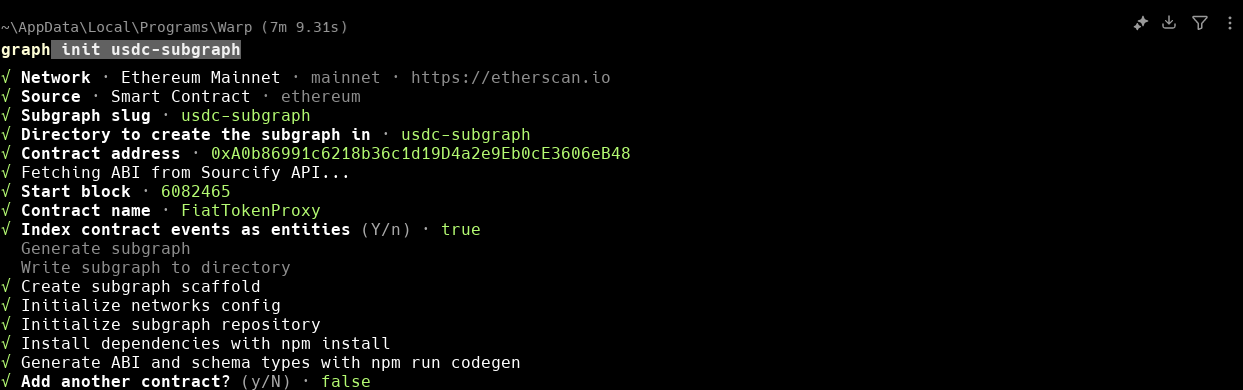
When prompted:

<Frame>
  <img src="https://mintcdn.com/ormilabs/vcU9W8gg4MUmMgRt/images/how-to/cli-graph-init-2.png?fit=max&auto=format&n=vcU9W8gg4MUmMgRt&q=85&s=c8c6df75bf431aafbb0ce21281b46baa" alt="0xGraph graph init" width="1243" height="390" data-path="images/how-to/cli-graph-init-2.png" />

  <figcaption>API Keys</figcaption>
</Frame>

1. **Network**: Ethereum Mainnet
2. **Source**: Smart contract: Ethereum
3. **Subgraph slug**: `create your own name`
4. **Contract address**: 0xA0b86991c6218b36c1d19D4a2e9Eb0cE3606eB48
5. **Contract name**: `create your own name`
6. **Start block**: (optional but recommended)

## Setting up the subgraph

```
cd <subgraph name>
```

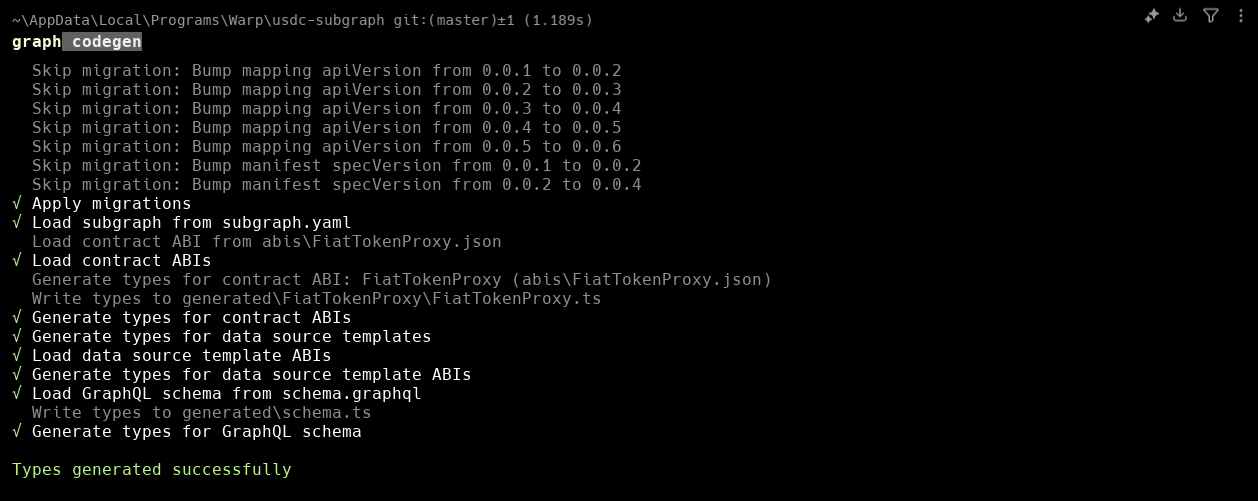
```
graph codegen
```

<Frame>
  <img src="https://mintcdn.com/ormilabs/vcU9W8gg4MUmMgRt/images/how-to/cli-graph-codegen.png?fit=max&auto=format&n=vcU9W8gg4MUmMgRt&q=85&s=65159f24638237bbe0a073566644e252" alt="0xGraph graph init" width="1258" height="501" data-path="images/how-to/cli-graph-codegen.png" />

  <figcaption>API Keys</figcaption>
</Frame>

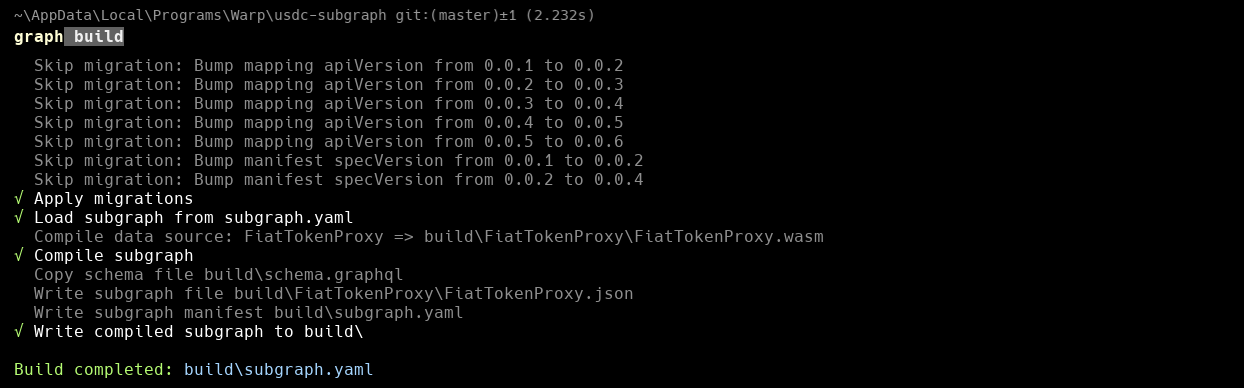
```
graph build
```

<Frame>
  <img src="https://mintcdn.com/ormilabs/vcU9W8gg4MUmMgRt/images/how-to/cli-graph-build.png?fit=max&auto=format&n=vcU9W8gg4MUmMgRt&q=85&s=b3f3fa2ea0b0043ea0a1abbc397a622f" alt="0xGraph graph init" width="1244" height="388" data-path="images/how-to/cli-graph-build.png" />

  <figcaption>API Keys</figcaption>
</Frame>

## Deploy the subgraph to 0xGraph

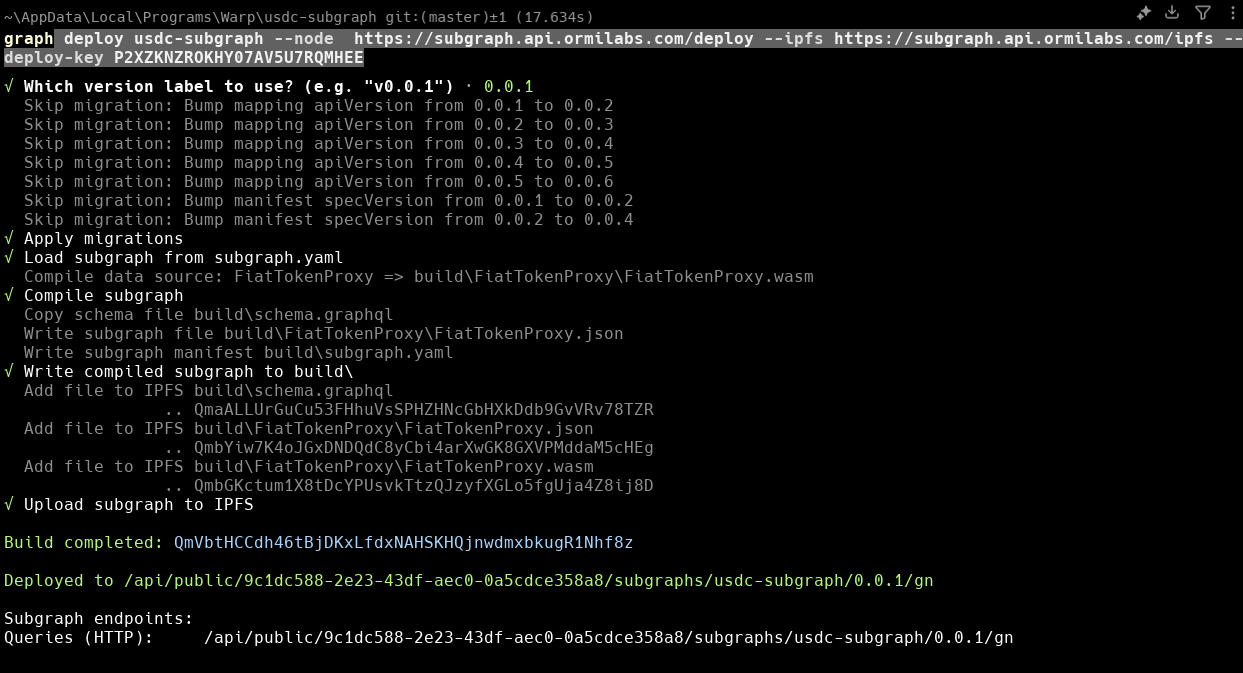
Return to your [API page](https://app.ormilabs.com/dashboard/api) and copy the information to paste it in the `API key` section below.

```
graph deploy <graph-name> --node  https://subgraph.api.ormilabs.com/deploy --ipfs https://subgraph.api.ormilabs.com/ipfs --deploy-key <API key>
```

<Frame>
  <img src="https://mintcdn.com/ormilabs/vcU9W8gg4MUmMgRt/images/how-to/cli-graph-deploy.png?fit=max&auto=format&n=vcU9W8gg4MUmMgRt&q=85&s=c9bd9481d0ac4b67ef7e9c29525be48a" alt="0xGraph graph init" width="1243" height="673" data-path="images/how-to/cli-graph-deploy.png" />

  <figcaption>API Keys</figcaption>
</Frame>

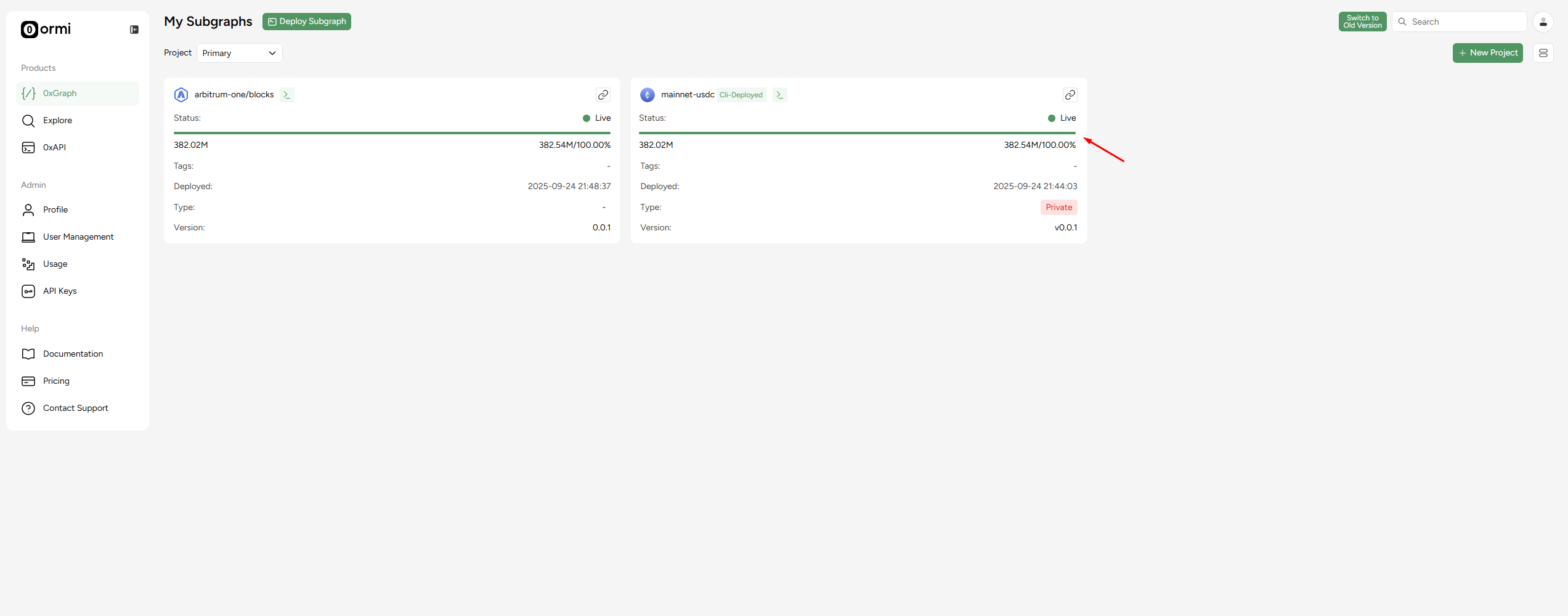
## Track sync status

You can check syncing in the dashboard by going to the Subgraphs tab:

<Frame>
  <img src="https://mintcdn.com/ormilabs/vcU9W8gg4MUmMgRt/images/how-to/cli-graph-sync.png?fit=max&auto=format&n=vcU9W8gg4MUmMgRt&q=85&s=059494b6496d79326a1852fc1eb690ee" alt="0xGraph graph init" width="2545" height="1000" data-path="images/how-to/cli-graph-sync.png" />

  <figcaption>API Keys</figcaption>
</Frame>

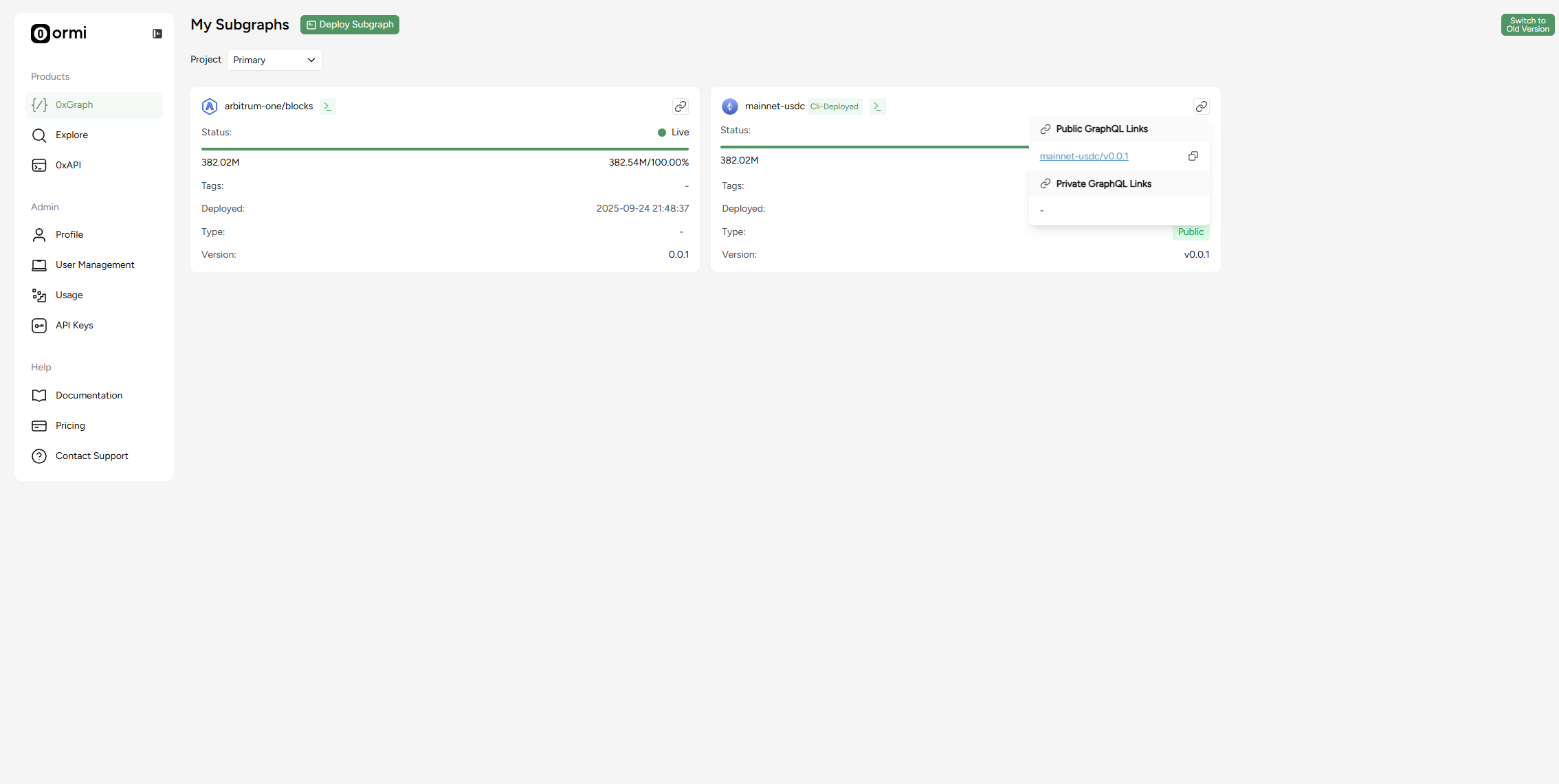
## Find the GraphQL link

Click the URL button and a graphql link will pop up. Click the graphql link.

<Frame>
  <img src="https://mintcdn.com/ormilabs/vcU9W8gg4MUmMgRt/images/how-to/cli-graph-graphql.png?fit=max&auto=format&n=vcU9W8gg4MUmMgRt&q=85&s=71e95b5652b6cb8909015373fa6773a8" alt="0xGraph graph init" width="2268" height="1141" data-path="images/how-to/cli-graph-graphql.png" />

  <figcaption>API Keys</figcaption>
</Frame>

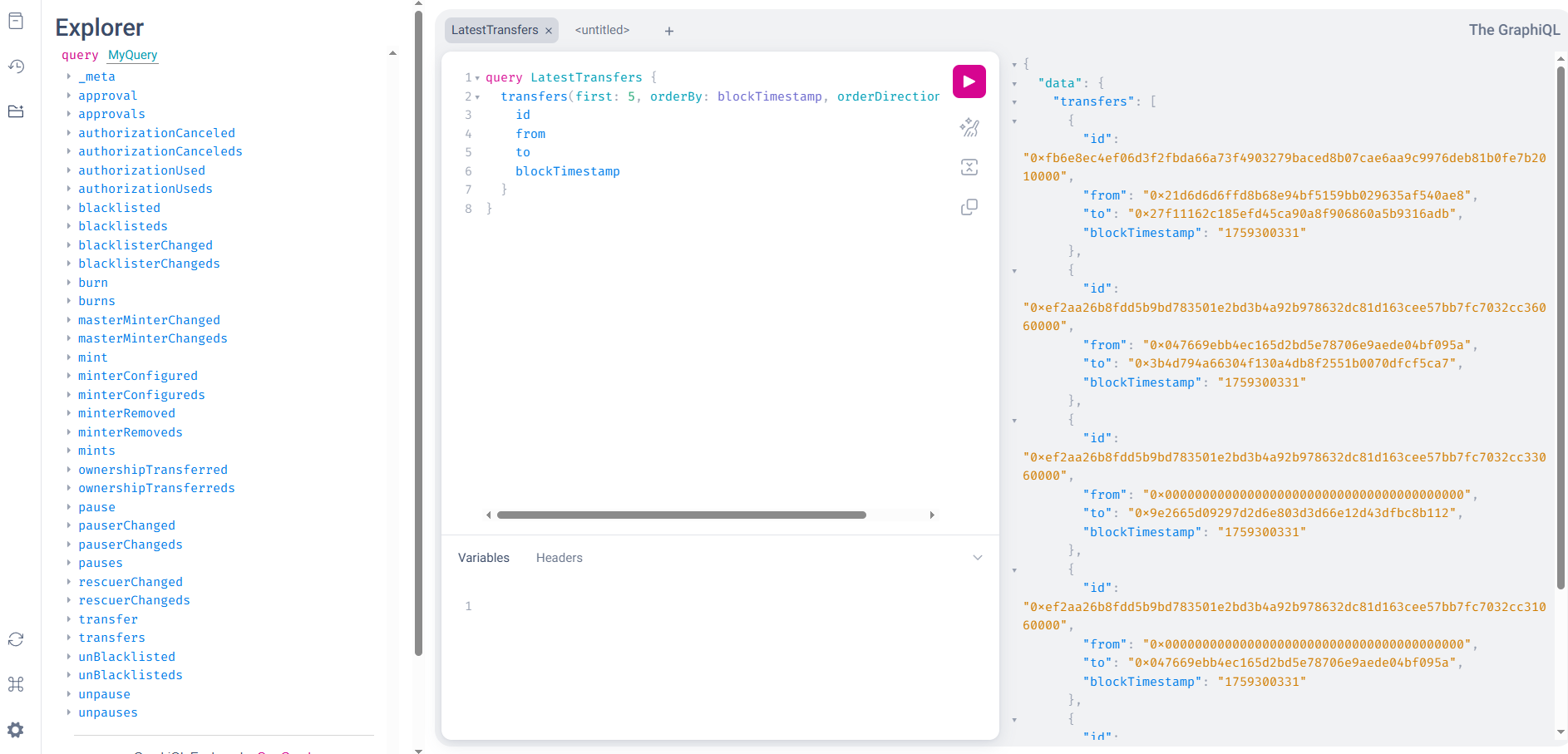
## Query your USDC subgraph

```
query LatestTransfers {
  transfers(first: 5, orderBy: blockTimestamp, orderDirection: desc) {
    id
    from
    to
    blockTimestamp
  }
}
```

<Frame>
  <img src="https://mintcdn.com/ormilabs/vcU9W8gg4MUmMgRt/images/how-to/cli-graphql-query.png?fit=max&auto=format&n=vcU9W8gg4MUmMgRt&q=85&s=27b586ae3ebe87dd133425527051e592" alt="0xGraph graph init" width="1886" height="907" data-path="images/how-to/cli-graphql-query.png" />

  <figcaption>API Keys</figcaption>
</Frame>

## You're all set up!

## Next steps
<div
  className="grid grid-cols-1 md:grid-cols-2 gap-6 not-prose"
  style={{
marginBottom: '4rem',
maxWidth: '1200px',
margin: '0 auto 4rem auto',
alignItems: 'stretch'
}}
>
  <a
    href="/docs/subgraphs/query-data/querying-a-subgraph"
    style={{
textDecoration: 'none',
color: 'inherit',
display: 'flex'
}}
  >
    <div
      className="group border border-gray-200 rounded-xl p-6 hover:border-green-500 hover:shadow-lg transition-all duration-200 cursor-pointer"
      style={{
  minHeight: '200px',
  display: 'flex',
  flexDirection: 'column',
  width: '100%'
}}
    >
      <div className="flex items-center mb-4">
        <div className="mr-3" style={{ color: '#3E744D' }}>
          <img src="https://mintcdn.com/ormilabs/qV2VfGqVCCe99Ked/images/icons/scan.svg?fit=max&auto=format&n=qV2VfGqVCCe99Ked&q=85&s=e45e14abccf8d0fec7df137623baa1ab" alt="query subgraph icon" width="20" height="20" data-path="images/icons/scan.svg" />
        </div>

        <div className="text-lg font-semibold text-gray-900" role="heading" aria-level="3">How to query a subgraph</div>
      </div>

      <p className="text-gray-600 text-sm flex-grow">
        Learn how to run GraphQL queries to fetch smart contract data from deployed subgraphs.
      </p>
    </div>
  </a>

  {" "}

  <a
    href="/docs/subgraphs/manage-and-monitor/monitor-subgraph"
    style={{
textDecoration: "none",
color: "inherit",
display: "flex",
}}
  >
    <div
      className="group border border-gray-200 rounded-xl p-6 hover:border-green-500 hover:shadow-lg transition-all duration-200 cursor-pointer"
      style={{
  minHeight: "200px",
  display: "flex",
  flexDirection: "column",
  width: "100%",
}}
    >
      <div className="flex items-center mb-4">
        <div className="mr-3" style={{ color: "#3E744D" }}>
          <img src="https://mintcdn.com/ormilabs/qV2VfGqVCCe99Ked/images/icons/monitor-check.svg?fit=max&auto=format&n=qV2VfGqVCCe99Ked&q=85&s=4955d6d9d247161fb8fe84ae89ce1203" alt="monitor subgraph icon" width="20" height="20" data-path="images/icons/monitor-check.svg" />
        </div>

        <div className="text-lg font-semibold text-gray-900" role="heading" aria-level="3">
          How to monitor your subgraph
        </div>
      </div>

      <p className="text-gray-600 text-sm flex-grow">Learn how to monitor your subgraph syncing progress and logs after deployment.</p>
    </div>
  </a>
</div>