> ## Documentation Index
> Fetch the complete documentation index at: https://ormilabs.com/docs/llms.txt
> Use this file to discover all available pages before exploring further.

# How to build a subgraph from scratch

> Index and query blockchain data in real-time via Subgraphs

<Note>
  If you plan to update or redeploy your subgraph in the future, create and use a tag before you start querying the endpoint.
  [Tags](/subgraphs/manage-and-monitor/tags) let you hot-swap new deployments under the same URL later without changing your front-end code.
</Note>

## Prerequisite

* [Graph CLI installed](https://www.npmjs.com/package/@graphprotocol/graph-cli?ref=blog.ormilabs.com)
* [node.js installed](https://nodejs.org/en)
* [Git installed](https://git-scm.com/downloads)

### Getting started

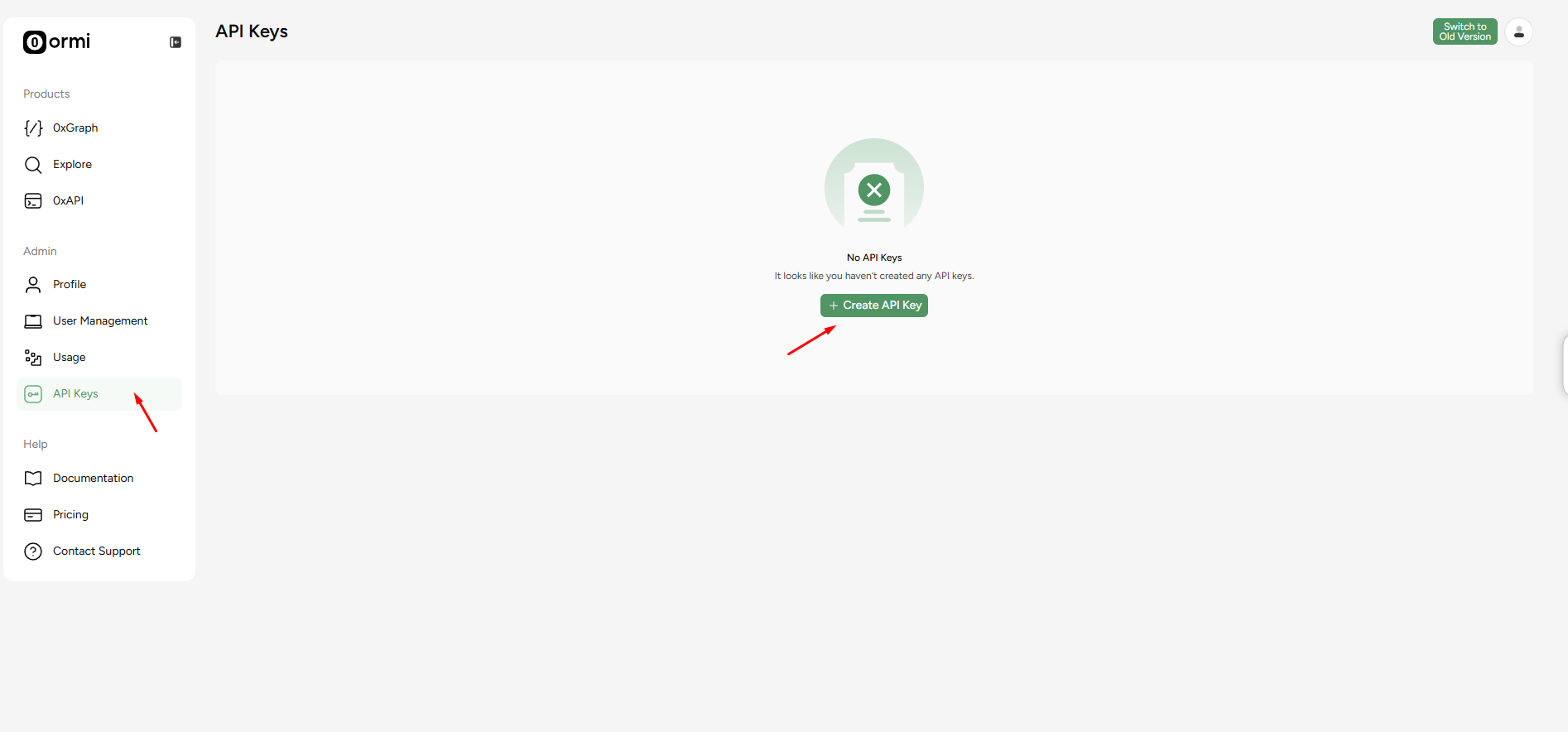
1. Log in to [Ormi](https://app.ormilabs.com/) and go to your dashboard.
2. From the dashboard, create an API key.

<Frame>
  <img src="https://mintcdn.com/ormilabs/vcU9W8gg4MUmMgRt/images/how-to/build-subgraph.png?fit=max&auto=format&n=vcU9W8gg4MUmMgRt&q=85&s=8c6505e0c7da85e6dee269b981fd4988" alt="0xGraph graph init" width="1894" height="884" data-path="images/how-to/build-subgraph.png" />

  <figcaption>API Keys</figcaption>
</Frame>

**Note**: Keep this page open, we’ll need the API key later to deploy a subgraph.

## Install Graph CLI

On your local machine, run the following in your terminal:

```
npm install -g @graphprotocol/graph-cli
```

## Create a directory for your subgraph

```
mkdir katana-blocks
cd katana-blocks
```

We’ll call the folder katana-blocks in this example.

## Initialize Node project

Run bash in the directory folder

```
npm init -y
```

## Install dependencies

```
npm install --save-dev @graphprotocol/graph-ts
npm install --save-dev assemblyscript
```

## Create the required files

You will need:

* subgraph.yaml
* schema.graphql
* mappings/blocks.ts
* abis/Dummy.json

### subgraph.yaml

```
specVersion: 0.0.5
description: Blocks indexer for Katana
schema:
  file: ./schema.graphql

dataSources:
  # We declare a contract data source so we can attach a blockHandler.
  # The "Dummy" ABI is unused but required by the manifest when kind=ethereum/contract.
  - kind: ethereum/contract
    name: KatanaBlocks
    network: katana
    source:
      address: "0x0000000000000000000000000000000000000000"  # not used
      abi: Dummy
      startBlock: 1
    mapping:
      kind: ethereum/events
      apiVersion: 0.0.7
      language: wasm/assemblyscript
      entities:
        - Block
      abis:
        - name: Dummy
          file: ./abis/Dummy.json
      # This is the key: run our handler every block
      blockHandlers:
        - handler: handleBlock
      file: ./mappings/blocks.ts
```

Note: `Dummy.json` is required because every data source must include at least one ABI, even if unused. Just put `[]` inside it.

### schema.graphql

```
type Block @entity(immutable: true) {
  id: ID!            # we will use the block number as the ID
  number: BigInt!
  timestamp: BigInt!
  hash: Bytes!
  parentHash: Bytes!
}
```

### Mapping files in typescript

```
import { Block as BlockEntity } from "../generated/schema";
import { ethereum } from "@graphprotocol/graph-ts";

export function handleBlock(block: ethereum.Block): void {
  // Use block number as the stable ID
  let id = block.number.toString();

  let entity = new BlockEntity(id);
  entity.number = block.number;
  entity.timestamp = block.timestamp;
  entity.hash = block.hash;
  entity.parentHash = block.parentHash;
  entity.save();
}
```

## Directory layout

```
katana-blocks/
├─ abis/
│  └─ Dummy.json
├─ mappings/
│  └─ blocks.ts
├─ schema.graphql
└─ subgraph.yaml
```

You’ll also see `node_modules/` after installing dependencies - that’s expected.

## Build the subgraph

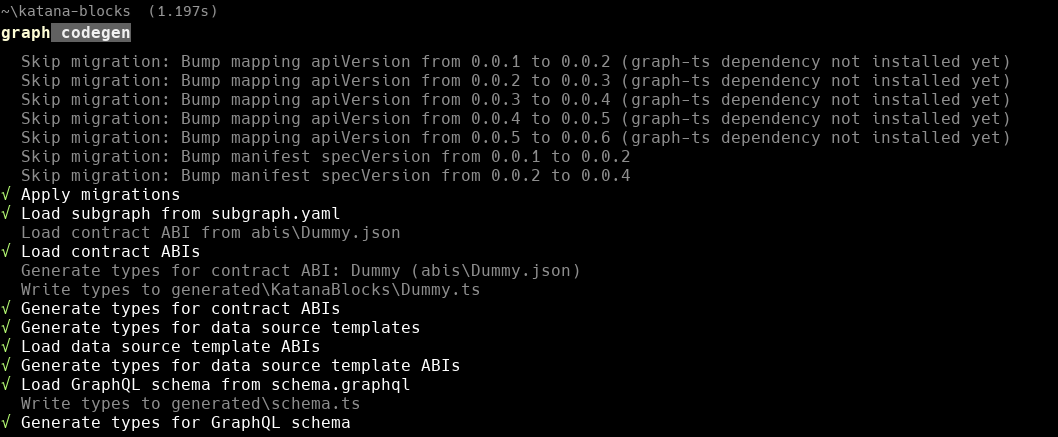
Generate types:

```
graph codegen
```

<Frame>
  <img src="https://mintcdn.com/ormilabs/vcU9W8gg4MUmMgRt/images/how-to/build-subgraph2.png?fit=max&auto=format&n=vcU9W8gg4MUmMgRt&q=85&s=a1baddd77f993524e7901dc598a17b4a" alt="0xGraph graph init" width="1058" height="437" data-path="images/how-to/build-subgraph2.png" />

  <figcaption>API Keys</figcaption>
</Frame>

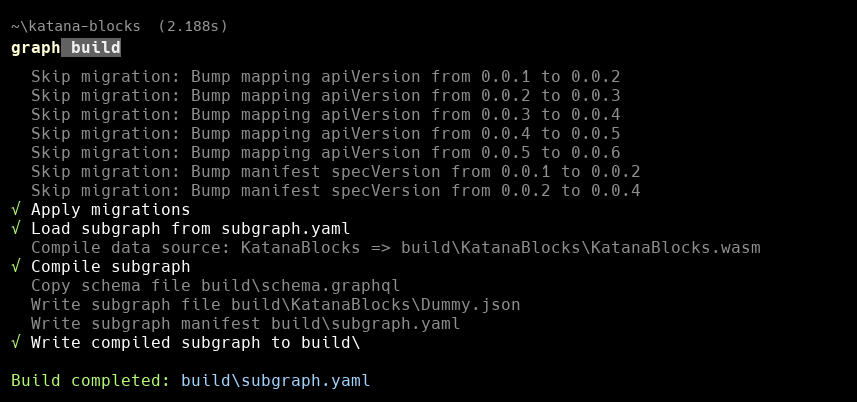
Now run:

```
graph build
```

<Frame>
  <img src="https://mintcdn.com/ormilabs/vcU9W8gg4MUmMgRt/images/how-to/build-subgraph3.png?fit=max&auto=format&n=vcU9W8gg4MUmMgRt&q=85&s=62f0d933d7626246f6465f34e2df6b5d" alt="0xGraph graph init" width="857" height="402" data-path="images/how-to/build-subgraph3.png" />

  <figcaption>API Keys</figcaption>
</Frame>

## Deploy the Subgraph to Ormi 0xGraph

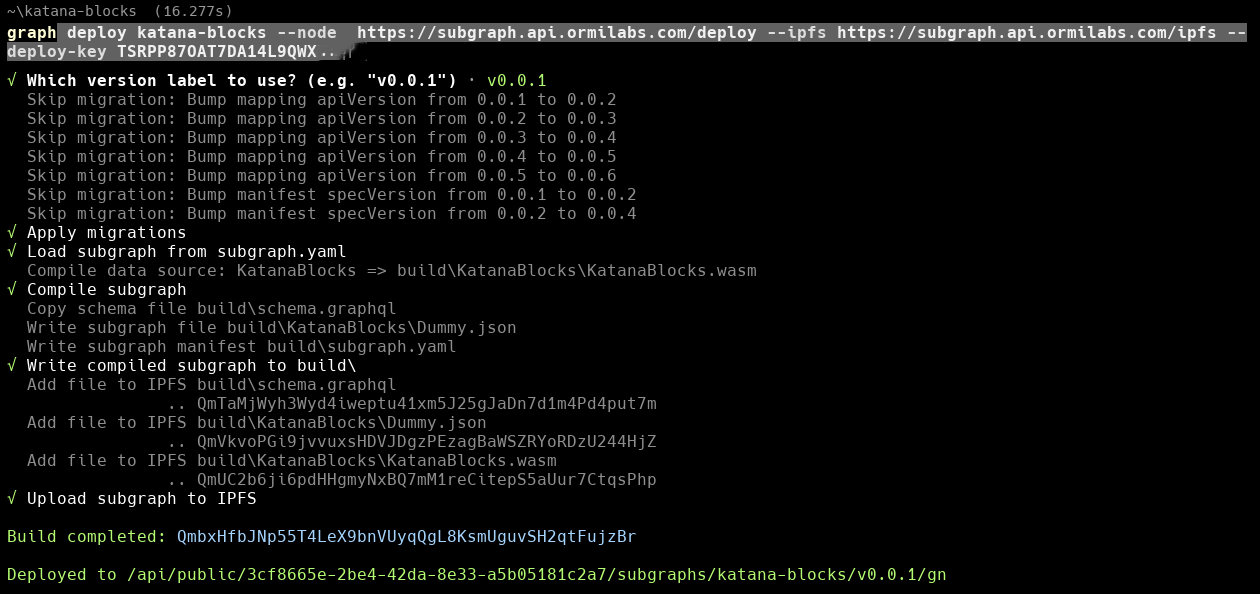
Return to your [API key](https://app.ormilabs.com/dashboard/api) from the dashboard.

Replace `graph-name` and `API key` with your actual values

```
graph deploy <graph-name> --node  https://subgraph.api.ormilabs.com/deploy --ipfs https://subgraph.api.ormilabs.com/ipfs --deploy-key <API key>
```

<Frame>
  <img src="https://mintcdn.com/ormilabs/vcU9W8gg4MUmMgRt/images/how-to/build-subgraph4.png?fit=max&auto=format&n=vcU9W8gg4MUmMgRt&q=85&s=938e574af9fa5879c3e76098cd42ff19" alt="0xGraph graph init" width="1260" height="594" data-path="images/how-to/build-subgraph4.png" />

  <figcaption>API Keys</figcaption>
</Frame>

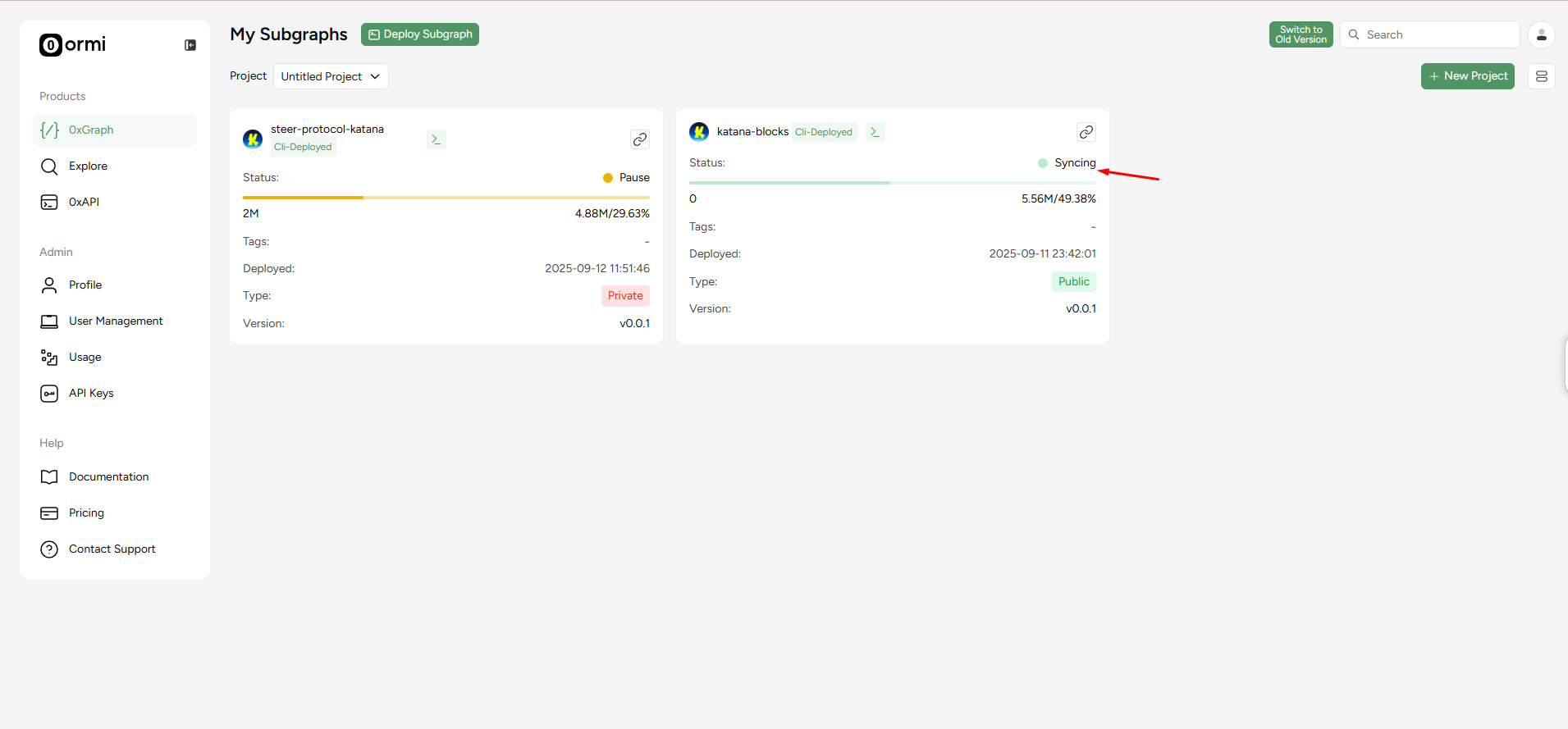
## Track sync status

You can check syncing in the dashboard by going to the Subgraphs tab:

<Frame>
  <img src="https://mintcdn.com/ormilabs/vcU9W8gg4MUmMgRt/images/how-to/build-subgraph5.png?fit=max&auto=format&n=vcU9W8gg4MUmMgRt&q=85&s=e345147402c3684ca10aae65bfeecdf9" alt="0xGraph graph init" width="1911" height="889" data-path="images/how-to/build-subgraph5.png" />

  <figcaption>API Keys</figcaption>
</Frame>

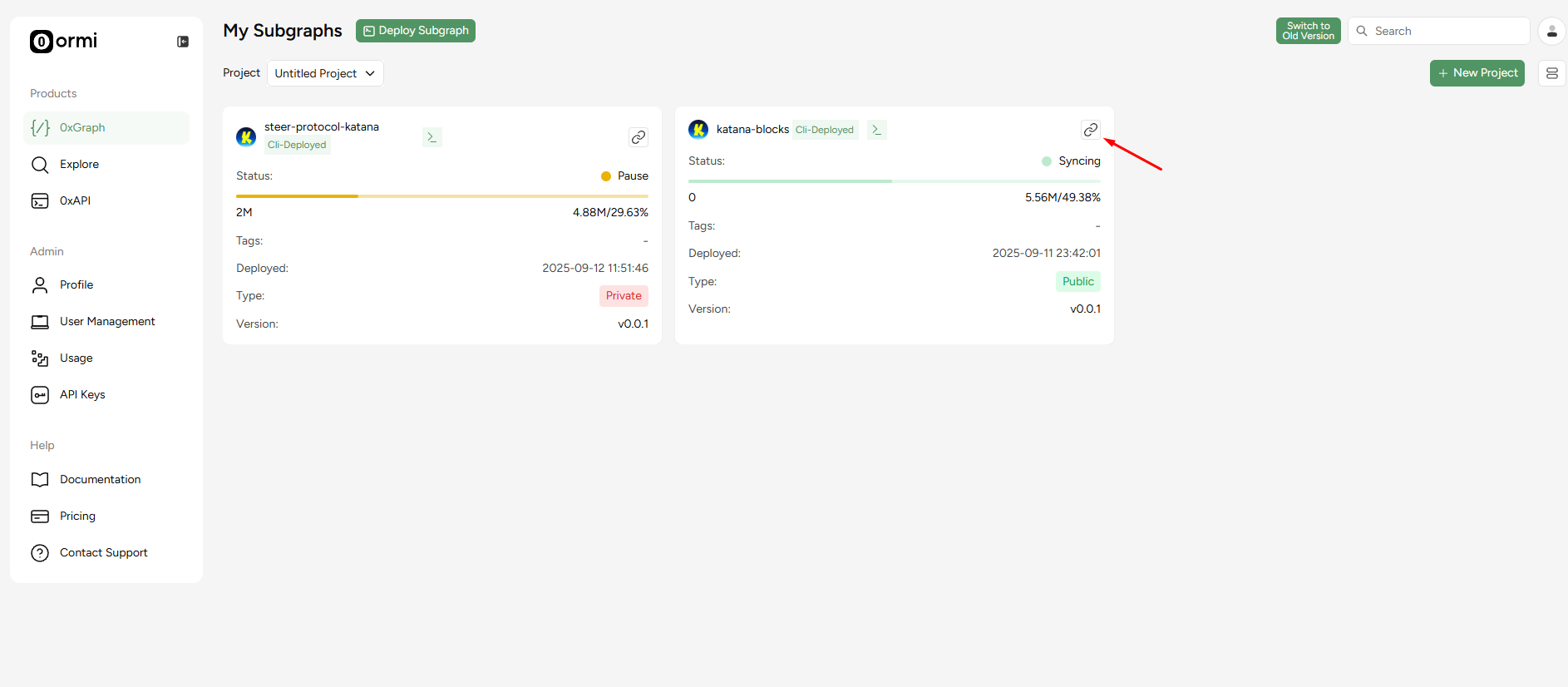
## Query Katana blocks

Click on the button where the red arrow is pointing.

<Frame>
  <img src="https://mintcdn.com/ormilabs/vcU9W8gg4MUmMgRt/images/how-to/build-subgraph6.png?fit=max&auto=format&n=vcU9W8gg4MUmMgRt&q=85&s=eb1bb529905cfa3587b9e526c802c00c" alt="0xGraph graph init" width="1886" height="826" data-path="images/how-to/build-subgraph6.png" />

  <figcaption>API Keys</figcaption>
</Frame>

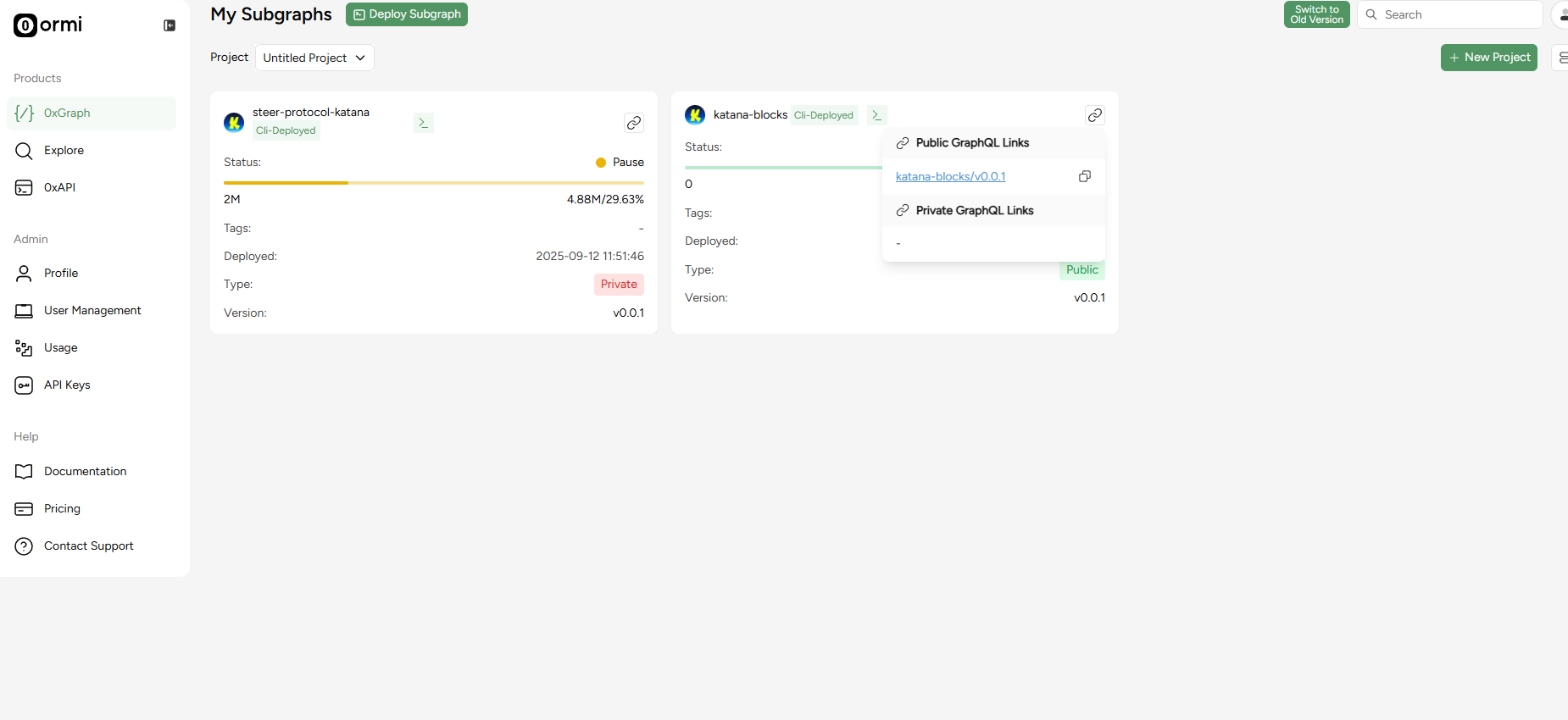
Once synced, click the GraphQL endpoint link in the dashboard.

<Frame>
  <img src="https://mintcdn.com/ormilabs/vcU9W8gg4MUmMgRt/images/how-to/build-subgraph7.png?fit=max&auto=format&n=vcU9W8gg4MUmMgRt&q=85&s=d8d60c65233f339e69bdb43008dab566" alt="0xGraph graph init" width="1850" height="850" data-path="images/how-to/build-subgraph7.png" />

  <figcaption>API Keys</figcaption>
</Frame>

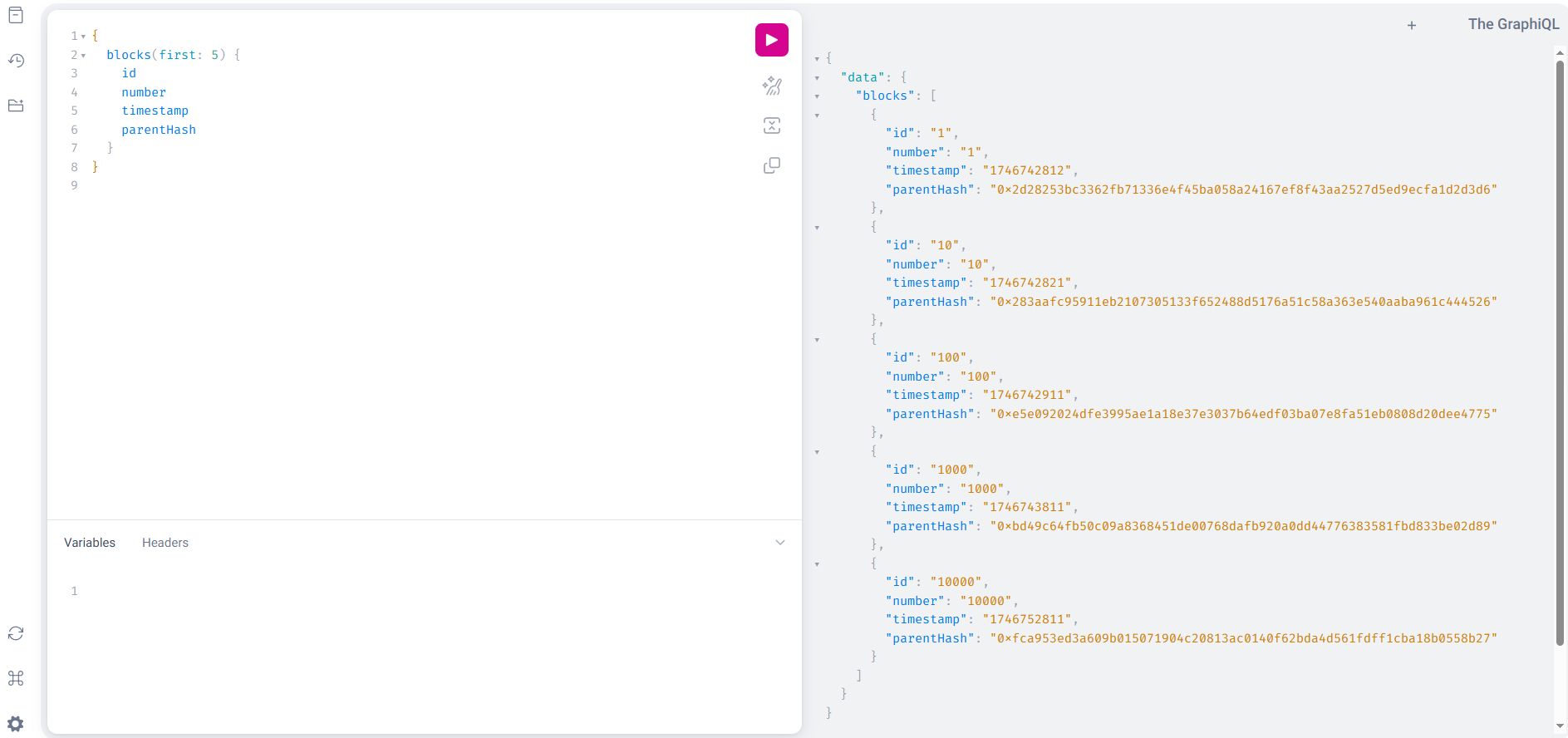
### Sample query

Run this query to fetch the latest 5 blocks

```
{
  blocks(first: 5) {
    id
    number
    timestamp
    parentHash
  }
}
```

<Frame>
  <img src="https://mintcdn.com/ormilabs/vcU9W8gg4MUmMgRt/images/how-to/build-subgraph8.png?fit=max&auto=format&n=vcU9W8gg4MUmMgRt&q=85&s=068d4937aa9234c5342aa3472a11bc7a" alt="0xGraph graph init" width="1887" height="888" data-path="images/how-to/build-subgraph8.png" />

  <figcaption>API Keys</figcaption>
</Frame>

## Done!

You now have a live subgraph indexing Katana blocks through [Ormi’s 0xGraph](https://app.ormilabs.com/).

## Next steps
<div
  className="grid grid-cols-1 md:grid-cols-2 gap-6 not-prose"
  style={{
marginBottom: '4rem',
maxWidth: '1200px',
margin: '0 auto 4rem auto',
alignItems: 'stretch'
}}
>
  <a
    href="/docs/subgraphs/query-data/querying-a-subgraph"
    style={{
textDecoration: 'none',
color: 'inherit',
display: 'flex'
}}
  >
    <div
      className="group border border-gray-200 rounded-xl p-6 hover:border-green-500 hover:shadow-lg transition-all duration-200 cursor-pointer"
      style={{
  minHeight: '200px',
  display: 'flex',
  flexDirection: 'column',
  width: '100%'
}}
    >
      <div className="flex items-center mb-4">
        <div className="mr-3" style={{ color: '#3E744D' }}>
          <img src="https://mintcdn.com/ormilabs/qV2VfGqVCCe99Ked/images/icons/scan.svg?fit=max&auto=format&n=qV2VfGqVCCe99Ked&q=85&s=e45e14abccf8d0fec7df137623baa1ab" alt="query subgraph icon" width="20" height="20" data-path="images/icons/scan.svg" />
        </div>

        <div className="text-lg font-semibold text-gray-900" role="heading" aria-level="3">How to query a subgraph</div>
      </div>

      <p className="text-gray-600 text-sm flex-grow">
        Learn how to run GraphQL queries to fetch smart contract data from deployed subgraphs.
      </p>
    </div>
  </a>

  {" "}

  <a
    href="/docs/subgraphs/manage-and-monitor/monitor-subgraph"
    style={{
textDecoration: "none",
color: "inherit",
display: "flex",
}}
  >
    <div
      className="group border border-gray-200 rounded-xl p-6 hover:border-green-500 hover:shadow-lg transition-all duration-200 cursor-pointer"
      style={{
  minHeight: "200px",
  display: "flex",
  flexDirection: "column",
  width: "100%",
}}
    >
      <div className="flex items-center mb-4">
        <div className="mr-3" style={{ color: "#3E744D" }}>
          <img src="https://mintcdn.com/ormilabs/qV2VfGqVCCe99Ked/images/icons/monitor-check.svg?fit=max&auto=format&n=qV2VfGqVCCe99Ked&q=85&s=4955d6d9d247161fb8fe84ae89ce1203" alt="monitor subgraph icon" width="20" height="20" data-path="images/icons/monitor-check.svg" />
        </div>

        <div className="text-lg font-semibold text-gray-900" role="heading" aria-level="3">
          How to monitor your subgraph
        </div>
      </div>

      <p className="text-gray-600 text-sm flex-grow">Learn how to monitor your subgraph syncing progress and logs after deployment.</p>
    </div>
  </a>
</div>