> ## Documentation Index
> Fetch the complete documentation index at: https://ormilabs.com/docs/llms.txt
> Use this file to discover all available pages before exploring further.

# How to generate an API key

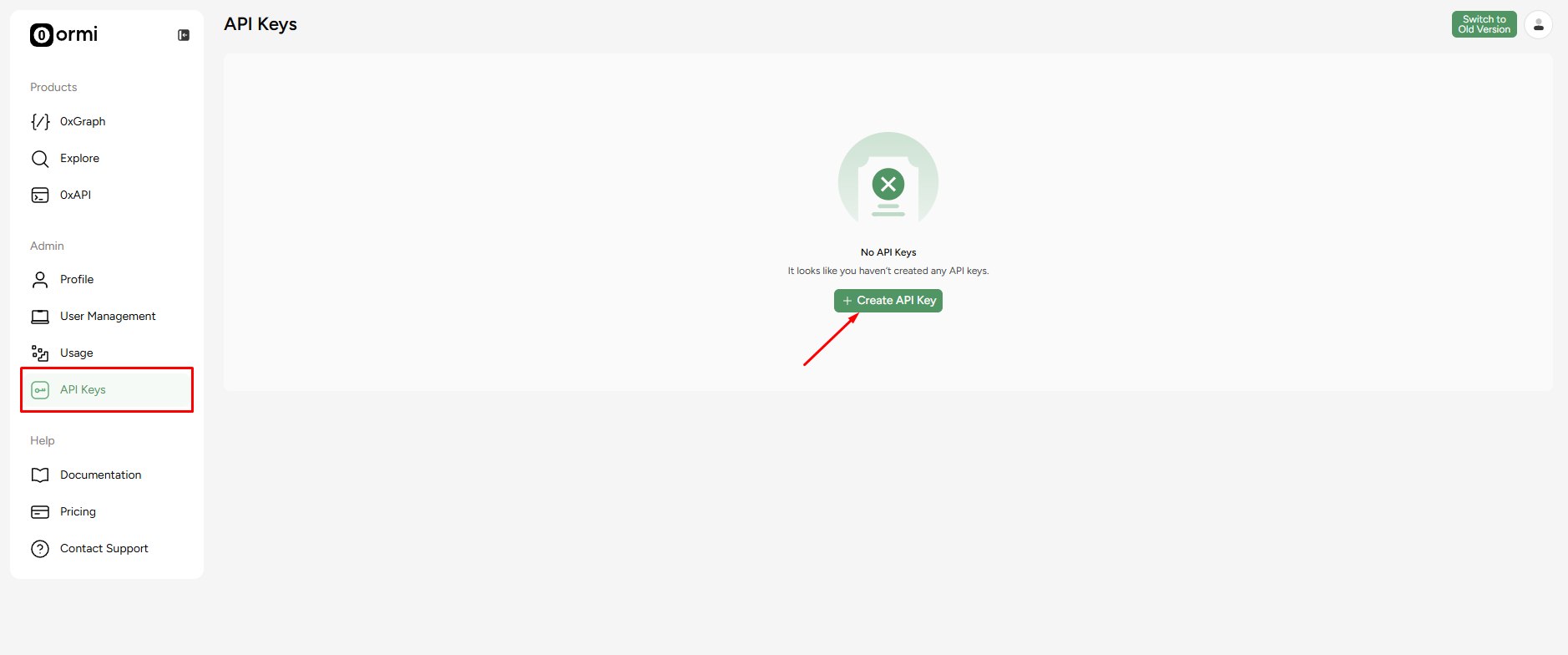
## **Step 1**: Go to the [API key page](https://app.ormilabs.com/dashboard/api) to generate an API key

<Frame>
  <img src="https://mintcdn.com/ormilabs/QF_fmnEzWAEcNv02/images/0xgraph-api-key.png?fit=max&auto=format&n=QF_fmnEzWAEcNv02&q=85&s=ac4ade1e29e7be09629130b131f3dd1b" alt="0xGraph API Keys" width="1878" height="784" data-path="images/0xgraph-api-key.png" />

  <figcaption>API Keys</figcaption>
</Frame>

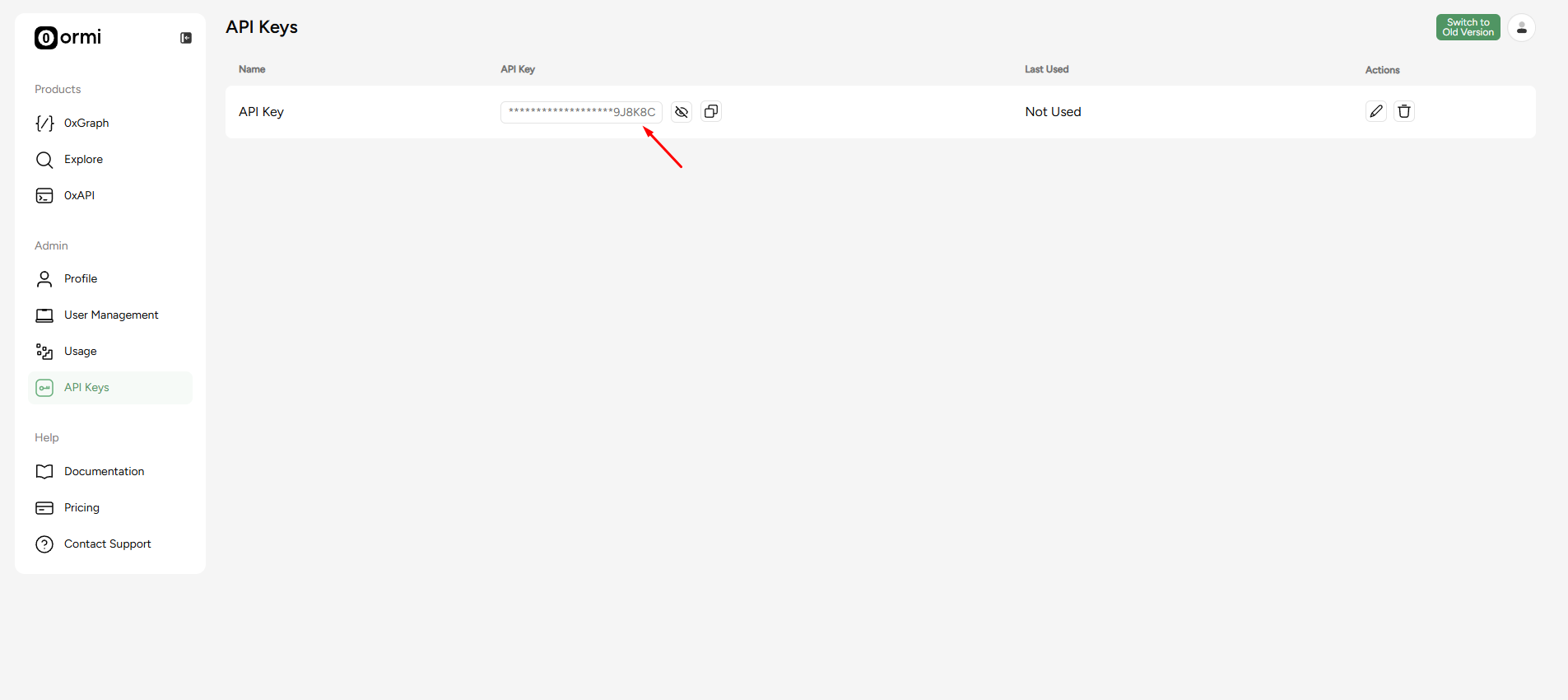
## **Step 2**: Click on 'Create API Key' to generate an API key.

<Frame>
  <img src="https://mintcdn.com/ormilabs/QF_fmnEzWAEcNv02/images/0xgraph-generated-api-key.png?fit=max&auto=format&n=QF_fmnEzWAEcNv02&q=85&s=27378c8be18ab8c673ad359d766c74b9" alt="0xGraph API Keys" width="1905" height="850" data-path="images/0xgraph-generated-api-key.png" />

  <figcaption>API Keys</figcaption>
</Frame>

After generating an API key, you can then copy and paste it into your commands as needed.

<Info>
  Warning: Always handle your API keys securely. Do not expose them in client-side code or share them publicly. Store them in a secure location, such as
  environment variables, and rotate them regularly to minimize security risks. If compromised, regenerate your API key immediately. For public repositories,
  store API keys in a .env file and add .env to .gitignore to prevent accidental exposure in your codebase.
</Info>

## Next steps

<div
  className="grid grid-cols-1 md:grid-cols-2 gap-6 not-prose"
  style={{
marginBottom: '4rem',
maxWidth: '1200px',
margin: '0 auto 4rem auto',
alignItems: 'stretch'
}}
>
  {" "}

  <a
    href="/docs/data-api/query-data/querying-data-api"
    style={{
textDecoration: "none",
color: "inherit",
display: "flex",
}}
  >
    <div
      className="group border border-gray-200 rounded-xl p-6 hover:border-green-500 hover:shadow-lg transition-all duration-200 cursor-pointer"
      style={{
  minHeight: "200px",
  display: "flex",
  flexDirection: "column",
  width: "100%",
}}
    >
      <div className="flex items-center mb-4">
        <div className="mr-3" style={{ color: "#3E744D" }}>
          <img src="https://mintcdn.com/ormilabs/qV2VfGqVCCe99Ked/images/icons/scan.svg?fit=max&auto=format&n=qV2VfGqVCCe99Ked&q=85&s=e45e14abccf8d0fec7df137623baa1ab" alt="query icon" width="20" height="20" data-path="images/icons/scan.svg" />
        </div>

        <div className="text-lg font-semibold text-gray-900" role="heading" aria-level="3">
          How to query Data API
        </div>
      </div>

      <p className="text-gray-600 text-sm flex-grow">Learn how to retrieve wallet, token, and transaction-level data with structured, low-latency endpoints.</p>
    </div>
  </a>

  {" "}

  <a
    href="/docs/api-reference/0xAPI/overview"
    style={{
textDecoration: "none",
color: "inherit",
display: "flex",
}}
  >
    <div
      className="group border border-gray-200 rounded-xl p-6 hover:border-green-500 hover:shadow-lg transition-all duration-200 cursor-pointer"
      style={{
  minHeight: "200px",
  display: "flex",
  flexDirection: "column",
  width: "100%",
}}
    >
      <div className="flex items-center mb-4">
        <div className="mr-3" style={{ color: "#3E744D" }}>
          <img src="https://mintcdn.com/ormilabs/qV2VfGqVCCe99Ked/images/icons/api-reference.svg?fit=max&auto=format&n=qV2VfGqVCCe99Ked&q=85&s=356f0be17121dc6590f0235b33a391ae" alt="api reference icon" width="20" height="20" data-path="images/icons/api-reference.svg" />
        </div>

        <div className="text-lg font-semibold text-gray-900" role="heading" aria-level="3">
          See API reference
        </div>
      </div>

      <p className="text-gray-600 text-sm flex-grow">Learn how to retrieve wallet, token, and transaction-level data with structured, low-latency endpoints.</p>
    </div>
  </a>
</div>
