> ## Documentation Index
> Fetch the complete documentation index at: https://ormilabs.com/docs/llms.txt
> Use this file to discover all available pages before exploring further.

# Quickstart

0xAPI gives developers fast, structured access to on-chain data across multiple networks.
Designed for reliability and ease of use, it offers targeted endpoints for core blockchain entities like:

* tokens,
* NFTs,
* transactions,
* blocks,
* wallets, and
* events

<div
  style={{
margin: "0",
padding: "1rem 1.25rem",
overflow: "hidden",
borderRadius: "1rem",
display: "flex",
gap: "0.75rem",
border: "1px solid rgba(113, 113, 122, 0.2)",
backgroundColor: "rgba(244, 244, 245, 0.5)",
}}
>
  <div style={{ marginTop: "0.125rem", width: "1rem" }}>
    <svg
      viewBox="0 0 20 20"
      fill="currentColor"
      xmlns="http://www.w3.org/2000/svg"
      style={{
    width: "1.25rem",
    height: "1.25rem",
    color: "rgba(113, 113, 122, 0.6)",
  }}
    >
      <path d="M8 0C3.58125 0 0 3.58125 0 8C0 12.4187 3.58125 16 8 16C12.4187 16 16 12.4187 16 8C16 3.58125 12.4187 0 8 0ZM8 14.5C4.41563 14.5 1.5 11.5841 1.5 8C1.5 4.41594 4.41563 1.5 8 1.5C11.5844 1.5 14.5 4.41594 14.5 8C14.5 11.5841 11.5844 14.5 8 14.5ZM9.25 10.5H8.75V7.75C8.75 7.3375 8.41563 7 8 7H7C6.5875 7 6.25 7.3375 6.25 7.75C6.25 8.1625 6.5875 8.5 7 8.5H7.25V10.5H6.75C6.3375 10.5 6 10.8375 6 11.25C6 11.6625 6.3375 12 6.75 12H9.25C9.66406 12 10 11.6641 10 11.25C10 10.8359 9.66563 10.5 9.25 10.5ZM8 6C8.55219 6 9 5.55219 9 5C9 4.44781 8.55219 4 8 4C7.44781 4 7 4.44687 7 5C7 5.55313 7.44687 6 8 6Z" />
    </svg>
  </div>

  <div style={{ fontSize: "0.875rem", minWidth: "0", width: "100%" }}>
    <h3 style={{ fontWeight: "600", margin: "0 0 0.5rem 0" }}>No account yet?</h3>
    <p style={{ margin: "0" }}> [Create an account](http://app.ormilabs.com) - free dev plan, no card required. </p>
  </div>
</div>

## Prerequisites

Before you begin, make sure you have:

* A registered [Ormi account](https://app.ormilabs.com)
* An [API key](/data-api/quickstart/generate-an-api-key)
* A REST client (e.g., curl, Postman, or any HTTP client)

## Get started

### **Step 1**: Identify the base URL

The base URL for all requests is:

```
https://api.data.ormilabs.com/
```

Each query starts with this base URL, followed by a specific endpoint path.

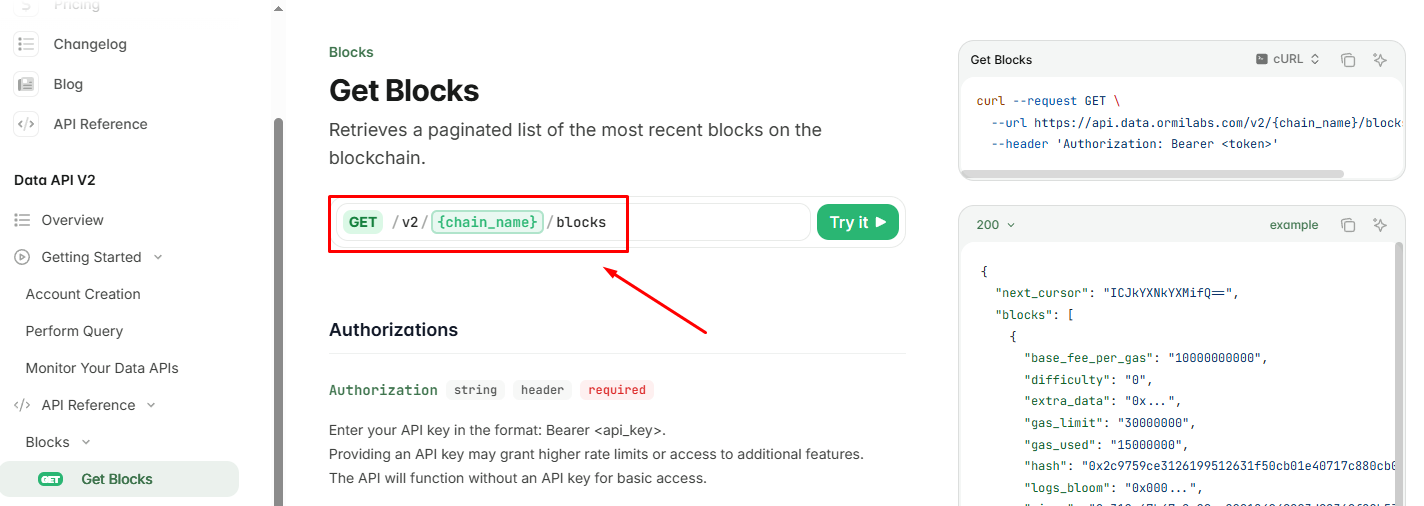
### **Step 2**: Add the endpoint path

<Frame>
  <img src="https://mintcdn.com/ormilabs/QF_fmnEzWAEcNv02/images/0xAPI/query1.png?fit=max&auto=format&n=QF_fmnEzWAEcNv02&q=85&s=8f5ea8f869659c054215b241ed8b82eb" alt="0xGraph API Keys" width="1424" height="506" data-path="images/0xAPI/query1.png" />

  <figcaption>API Keys</figcaption>
</Frame>

For example, to fetch block data from Ethereum mainnet:

```
/v2/eth-mainnet/blocks
```

### Resources

<div
  className="grid grid-cols-1 md:grid-cols-2 gap-6 not-prose"
  style={{
marginBottom: '4rem',
maxWidth: '1200px',
margin: '0 auto 4rem auto',
alignItems: 'stretch'
}}
>
  {" "}

  <a
    href="/docs/supported-chains/data-api"
    style={{
textDecoration: "none",
color: "inherit",
display: "block",
height: "100%",
}}
  >
    <div
      className="group border border-gray-200 rounded-xl hover:border-green-500 hover:shadow-lg transition-all duration-200 cursor-pointer"
      style={{
  padding: "1.25rem 1.5rem",
  height: "100%",
  display: "flex",
  flexDirection: "column",
}}
    >
      <div style={{ display: "flex", alignItems: "center", marginBottom: "0.5rem" }}>
        <div style={{ color: "#3E744D", marginRight: "0.75rem" }}>
          <img src="https://mintcdn.com/ormilabs/qV2VfGqVCCe99Ked/images/icons/link.svg?fit=max&auto=format&n=qV2VfGqVCCe99Ked&q=85&s=55e33c4f933be846949d5440402027a6" alt="supported chain icon" width="20" height="20" data-path="images/icons/link.svg" />
        </div>

        <div className="text-lg font-semibold text-gray-900" role="heading" aria-level="3">
          Find supported chains
        </div>
      </div>

      <p className="text-gray-600 text-sm" style={{ margin: 0, lineHeight: "1.4" }}>
        See all the supported chains for `chain_name`
      </p>
    </div>
  </a>

  {" "}

  <a
    href="/docs/api-reference/0xAPI/overview"
    style={{
textDecoration: "none",
color: "inherit",
display: "block",
height: "100%",
}}
  >
    <div
      className="group border border-gray-200 rounded-xl hover:border-green-500 hover:shadow-lg transition-all duration-200 cursor-pointer"
      style={{
  padding: "1.25rem 1.5rem",
  height: "100%",
  display: "flex",
  flexDirection: "column",
}}
    >
      <div style={{ display: "flex", alignItems: "center", marginBottom: "0.5rem" }}>
        <div style={{ color: "#3E744D", marginRight: "0.75rem" }}>
          <img src="https://mintcdn.com/ormilabs/qV2VfGqVCCe99Ked/images/icons/api-reference.svg?fit=max&auto=format&n=qV2VfGqVCCe99Ked&q=85&s=356f0be17121dc6590f0235b33a391ae" alt="api-reference icon" width="20" height="20" data-path="images/icons/api-reference.svg" />
        </div>

        <div className="text-lg font-semibold text-gray-900" role="heading" aria-level="3">
          Find endpoint path
        </div>
      </div>

      <p className="text-gray-600 text-sm" style={{ margin: 0, lineHeight: "1.4" }}>
        Check out the API reference to find each endpoint's path.
      </p>
    </div>
  </a>
</div>

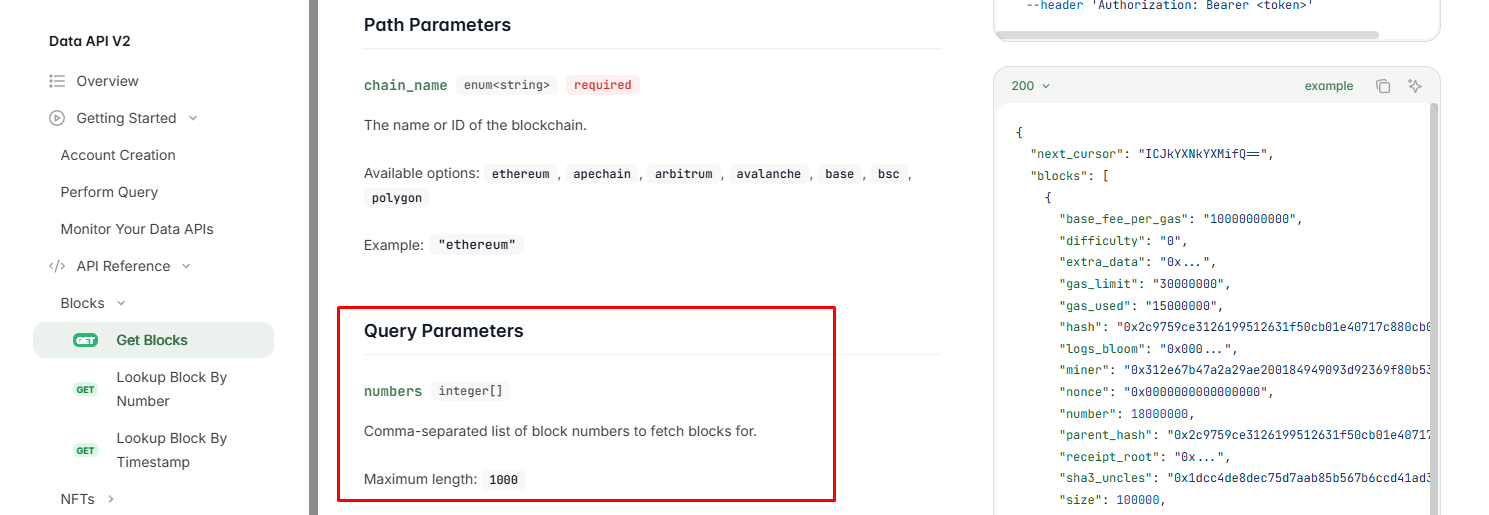
### **Step 3**: Include query parameters

Use query parameters to customize your request and narrow down the results.

Common examples include filtering by wallet address, limiting response size, or selecting specific block ranges.

```
?wallet_address=0x...&limit=20&from_block=10000000
```

<Frame>
  <img src="https://mintcdn.com/ormilabs/QF_fmnEzWAEcNv02/images/0xAPI/query2.png?fit=max&auto=format&n=QF_fmnEzWAEcNv02&q=85&s=c31694fcae984f2e32d1402c7c85b3e1" alt="0xGraph API Keys" width="1489" height="515" data-path="images/0xAPI/query2.png" />

  <figcaption>API Keys</figcaption>
</Frame>

Each endpoint supports its own parameter set - see the [API Reference](/api-reference/0xAPI/overview) for details.

### **Step 4**: Add authentication headers

```
Authorization: Bearer YOUR_API_KEY
```

### **Step 5**: Make the request

Use your REST client to send a GET request to the constructed URL.

Below is a minimal example using `curl`:

```
curl --request GET \
  --url https://api.data.ormilabs.com/v2/{chain_name}/blocks \
  --header 'Authorization: Bearer <token>'
```

Replace `<token>` with your API key and `{chain_name}` with the network you’re querying (ex. `eth-mainnet`).

## Next steps

<div
  className="grid grid-cols-1 md:grid-cols-2 gap-6 not-prose"
  style={{
marginBottom: '4rem',
maxWidth: '1200px',
margin: '0 auto 4rem auto',
alignItems: 'stretch'
}}
>
  {" "}

  <a
    href="/docs/data-api/query-data/querying-data-api"
    style={{
textDecoration: "none",
color: "inherit",
display: "flex",
}}
  >
    <div
      className="group border border-gray-200 rounded-xl p-6 hover:border-green-500 hover:shadow-lg transition-all duration-200 cursor-pointer"
      style={{
  minHeight: "200px",
  display: "flex",
  flexDirection: "column",
  width: "100%",
}}
    >
      <div className="flex items-center mb-4">
        <div className="mr-3" style={{ color: "#3E744D" }}>
          <img src="https://mintcdn.com/ormilabs/qV2VfGqVCCe99Ked/images/icons/scan.svg?fit=max&auto=format&n=qV2VfGqVCCe99Ked&q=85&s=e45e14abccf8d0fec7df137623baa1ab" alt="query icon" width="20" height="20" data-path="images/icons/scan.svg" />
        </div>

        <div className="text-lg font-semibold text-gray-900" role="heading" aria-level="3">
          How to query Data API
        </div>
      </div>

      <p className="text-gray-600 text-sm flex-grow">Learn how to retrieve wallet, token, and transaction-level data with structured, low-latency endpoints.</p>
    </div>
  </a>

  {" "}

  <a
    href="/docs/api-reference/0xAPI/overview"
    style={{
textDecoration: "none",
color: "inherit",
display: "flex",
}}
  >
    <div
      className="group border border-gray-200 rounded-xl p-6 hover:border-green-500 hover:shadow-lg transition-all duration-200 cursor-pointer"
      style={{
  minHeight: "200px",
  display: "flex",
  flexDirection: "column",
  width: "100%",
}}
    >
      <div className="flex items-center mb-4">
        <div className="mr-3" style={{ color: "#3E744D" }}>
          <img src="https://mintcdn.com/ormilabs/qV2VfGqVCCe99Ked/images/icons/api-reference.svg?fit=max&auto=format&n=qV2VfGqVCCe99Ked&q=85&s=356f0be17121dc6590f0235b33a391ae" alt="api reference icon" width="20" height="20" data-path="images/icons/api-reference.svg" />
        </div>

        <div className="text-lg font-semibold text-gray-900" role="heading" aria-level="3">
          See API reference
        </div>
      </div>

      <p className="text-gray-600 text-sm flex-grow">Learn how to retrieve wallet, token, and transaction-level data with structured, low-latency endpoints.</p>
    </div>
  </a>
</div>